

Atlan
Set up Bigeye
Before you can integrate Bigeye with Atlan, you need to map Atlan connections to the corresponding source in Bigeye. This allows for an efficient matching of assets between the two products. Unmapped sources in Bigeye will be ignored for the integration.
Prerequisites
- Admin access to Bigeye
- The qualified name for each Atlan connection that corresponds to a source in Bigeye
- The ID of the Bigeye user that will crawl metadata from the Bigeye workspace.
Map Atlan connections to Bigeye sources
You need to enable the mapping functionality in Bigeye and update source(s) with the qualified name of a connection.
-
Enable the
Atlan Connection IDfield for sources in Bigeye under Settings > Advanced Settings > Data Catalogs.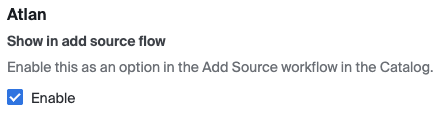
-
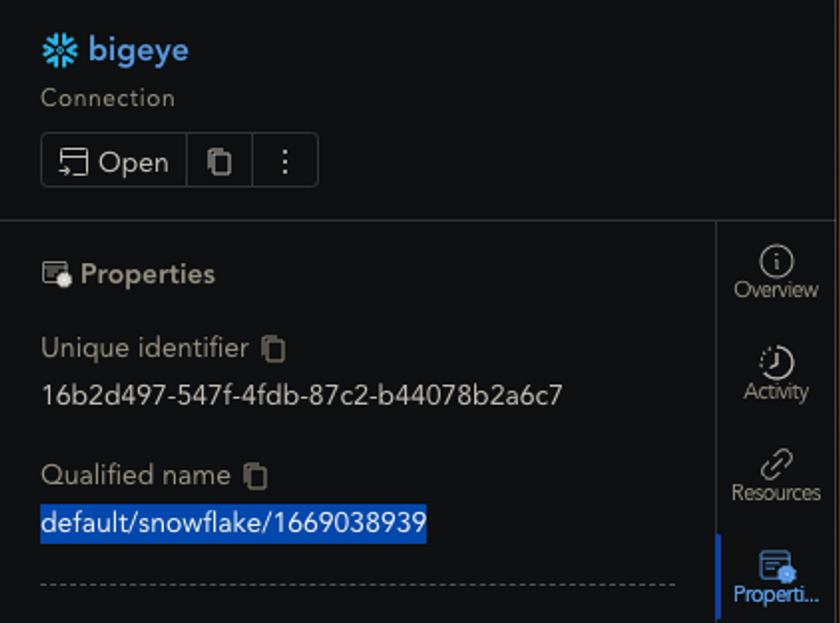
Retrieve the qualified name of the connection in Atlan. It can be found in the Properties tab of the connection object within Atlan. You can find Connections under the Access Control section in the Governance center of the catalog.
-
Update
Atlan Connection IDfield of the source in Bigeye with the qualified name of the connection. If the source connection is agent-based, the update needs to be done via the API (example cURL command below).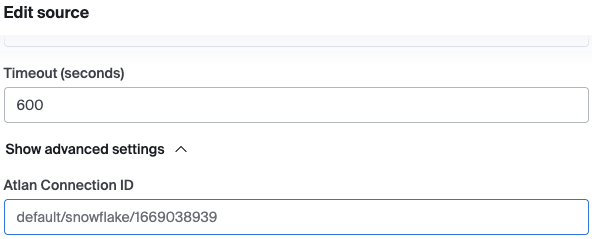
curl --location 'https://app.bigeye.com/api/v1/sources' \
--header 'Content-Type: application/json' \
--header 'Authorization: apikey <bigeye_personal_api_key>' \
--data '{
  "temporalAgentSecret": "exists",
  "id": <bigeye_source_id>,
  "atlanConnectionId": "default/snowflake/1669038939",
  "workspaceId": <bigeye_workspace_id>
}'
Find your Bigeye user ID
To find your user ID, go to Settings > Users in the UI. You'll see the numeric ID listed for each user
Integrate Bigeye with Atlan
After mapping connections to Bigeye sources, use the Atlan documentation to finish configuration.
Updated 2 months ago