
Lineage Plus Agent
Managed by the Bigeye agent installer
Requirements
Pre-install checklist
-
Set up a VM / host (Ubuntu (20.04+) or Redhat Linux (RHEL 8+) preferred)
- Minimum hardware size
- 25GB of RAM
- 4 CPU
- 55 GB disk space
- Networking
- Firewall access to the hostname and URL paths provided below:
app-metacenter-portal.bigeye.comapp-metacenter-solr.bigeye.com
- The firewall rules should NOT strip any Authorization headers for the below mentioned host/domain names.
- Egress (outbound) Access to the data sources you wish to add to track Lineage in Bigeye
- Egress (outbound) Access to the Bigeye SaaS environment
- app.bigeye.com
- Ingress (inbound) Access to retrieve Licenses from Bigeye for Agent CLI
- Access to pull images from docker.io
- Firewall access to the hostname and URL paths provided below:
- Minimum hardware size
-
Bigeye information (provided by Bigeye)
- The company name associated with your agent installs
- The password to authenticate to your tenant and get your associated Lineage Plus License
-
Docker PAT
- Provided by Bigeye
Updating the Lineage Plus Agent in the CLI
Use the command below to update the lineage plus agent through the Agent CLI.
./bigeye-agent lineage upgradeEmail Notifications
The Lineage Plus agent can send email notifications after lineage runs complete, providing a summary of successes and failures across all connections.
Configuring Notifications
Notifications can be configured during initial installation or at any time using:
./bigeye-agent lineage configure notificationsYou will be prompted to provide:
- Enable/disable notifications — Master toggle for email notifications.
- Email recipients — A comma-separated list of email addresses to receive notifications.
- Notify on success — Whether to include successful connector runs in the notification (default: Yes).
- Notify on failure — Whether to include failed connector runs in the notification (default: Yes).
YAML Configuration
Notification settings are stored in bigeye_agent.yml under the Lineage Plus agent properties:
agents:
  - type: LINEAGE_PLUS
    properties:
      notifications:
        enabled: true
        recipients:
          - [email protected]
          - [email protected]
        notify_on_success: true
notify_on_failure: true| Field | Type | Default | Description |
|---|---|---|---|
enabled | boolean | false | Master toggle for email notifications. |
recipients | list of strings | [] | Email addresses that will receive run notifications. |
notify_on_success | boolean | true | Include successful connector runs in the notification email. |
notify_on_failure | boolean | true | Include failed connector runs in the notification email. |
Notification Email Content
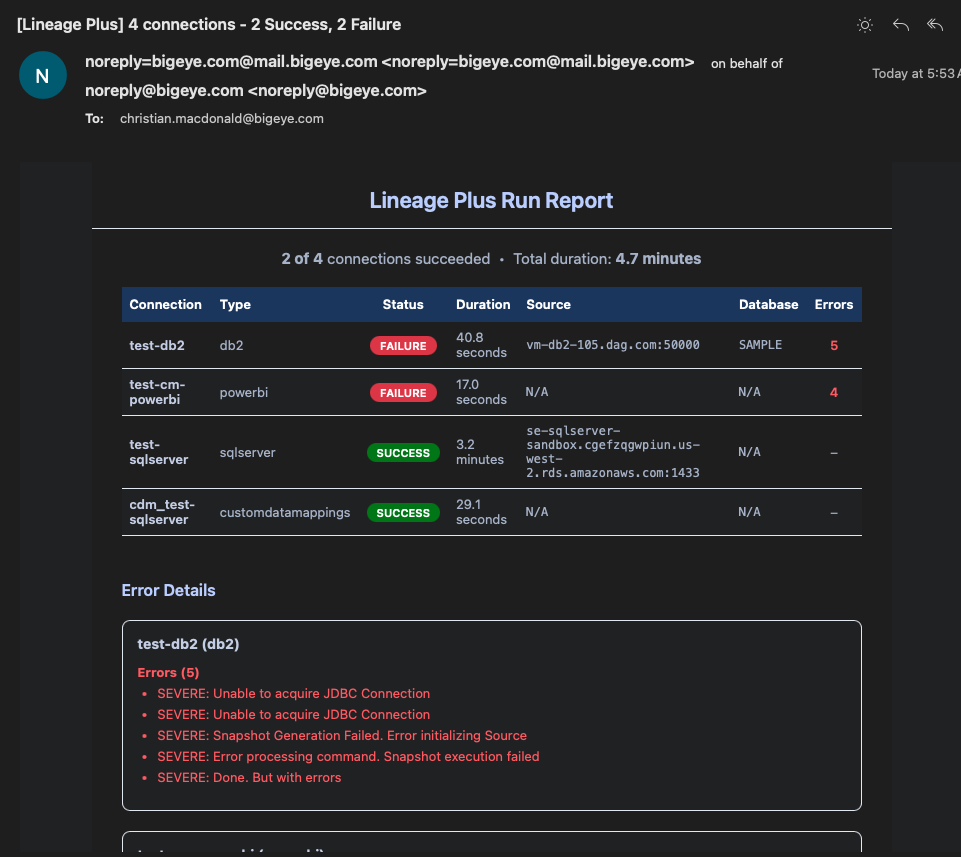
After all connectors finish running, a single consolidated email is sent containing:
- Subject line:
[Lineage Plus] N connections - X Success, Y Failure - Summary: Total connections run, success/failure counts, and total duration.
- Results table: Each connection with its connector type, status, duration, source, and database.
- Error details: For any failed connections, up to 10 errors and 5 warnings are included.
Example email:
Skipping Notifications for a Single Run
To skip sending notifications for a specific run without changing your configuration:
./bigeye-agent lineage run --skip-notificationsLog Retention
The Lineage Plus agent stores logs for each connector run in timestamped directories under ./logs/<connector_type>/. By default, the agent retains the 3 most recent log directories per connector type. Log retention can be customized per connector type to keep more or fewer historical logs.
Configuring Log Retention
Log retention can be configured during initial installation or at any time using:
./bigeye-agent lineage configure log-retentionYou will be prompted to enter retention settings as connector:count pairs. For example:
sqlserver:10, powerbi:5, tableau:7Any connector type not explicitly configured will use the default retention of 3 directories.
YAML Configuration
Log retention settings are stored in bigeye_agent.yml under the Lineage Plus agent properties:
agents:
  - type: LINEAGE_PLUS
    properties:
      log_retention:
        sqlserver: 10
        powerbi: 5
tableau: 7| Field | Type | Default | Description |
|---|---|---|---|
log_retention | map of string to integer | null | Maps connector type names to the number of log directories to retain. When null or when a connector type is not listed, the default of 3 is used. Each value must be at least 1. |
How It Works
After every connector run, the agent automatically cleans up old log directories:
- The agent looks in
./logs/<connector_type>/for timestamped run directories (format:YYYYMMDD_HHMMSS). - Directories are sorted by timestamp in descending order (newest first).
- Any directories beyond the configured retention count are removed.
This cleanup runs automatically — no additional commands are needed. Adjusting the retention count only changes how many historical directories are preserved going forward.
Run on Kubernetes
Partial SupportThe steps below, and the chart provided, do not support scenarios where custom jars are required for lineage collection, or scenarios where any customization exceeds the size limit of a Kubernetes ConfigMap (1 MiB). Full support for Lineage Plus on Kubernetes is still in the development stage.
To run on Kubernetes, the Agent CLI is required. Follow the steps of the setup section, and then return here to complete the following prerequisites:
- Installing the Lineage Plus agent
- Add any connectors for lineage collection. (This generates the necessary files for lineage collection)
# Run the install command and choose LINEAGE_PLUS
./bigeye-agent install

# Add the necessary connectors
./bigeye-agent add-connector
What to expectRunning the install command will create a file called
bigeye_agent.yml. This will store information for Bigeye, the Lineage Plus agent, and connection information for sources where lineage will be collected.The add-connector command will create a directory called lineage_config. Within that directory will be all the necessary files for the lineage process to run. These files will be used to run the process as a Kubernetes job.
Configure Kubernetes
Download the chart for Lineage Plus on Kubernetes. It can be an ad hoc Job or CronJob
# Download K8s ad hoc Job yaml (the namepsace set in the file is bigeye)
wget https://bigeye-public-web.s3.amazonaws.com/lineage-plus-kubernetes.yaml

# Download CronJob yaml
wget https://bigeye-public-web.s3.us-west-2.amazonaws.com/lineage-plus-kubernetes-cronjob.yaml-
Update the resource limits in
lineage-plus-kubernetes.yamlto match the value entered during the Lineage Plus installation. This is the value of themax_memoryparameter inbigeye_agent.yml. -
Update the
log_dirvariable inlineage_config/global_settings.shto match themountPathof thelogs-volvolume mount of the container. -
Create a
configMapof the necessary files.Each connector type is differentThe first two files listed in the command below will have path and file names dependent upon the connector type specified. For example, a connector for Postgres would have
postgresqlin the path with files namedpostgresql.propertiesandpostgresql.sh. The example below shows a connector for Snowflake. Verify paths and names by looking at thelineage_config/connectorsdirectory# Example configMap for Snowflake kubectl create configmap -n bigeye tmp-lineage-plus-config \ --from-file=lineage_config/connectors/snowflake/snowflake.properties \ --from-file=lineage_config/connectors/snowflake/snowflake.sh \ --from-file=lineage_config/lineage_plus.properties \ --from-file=lineage_config/global_settings.sh \ --from-file=lineage_config/system.properties \ --from-file=lineage_config/lineage_plus.lic \ --from-file=lineage_config/application-context.xml -
Verify in
lineage-plus-kubernetes.yamlthat the container command executes/app/lineage_plus/scripts/<connector_type>.shAlso, there are mount paths in theinitContainerthat need to reference the correct connector type. These will look likemountPath: /tmp/lineage_plus/scripts/<connector_type>.shandmountPath: /tmp/lineage_plus/config/snapshot/<connector_type>.properties. -
Run Lineage Plus
# Apply the job
kubectl apply -f lineage-plus-kubernetes.yaml

# View pods
kubectl get pods -n bigeye
NAME                        READY   STATUS      RESTARTS   AGE
bigeye-lineage-plus-dgwn3   0/1     Running     0          16m

# View logs (add -f to tail)
kubectl logs -n bigeye bigeye-lineage-plus-dgwn3

# Delete the job when it completes
kubectl delete -f lineage-plus-kubernetes.yaml
Updated 3 days ago