

Agent Orchestrator
Manage self-hosted agents and run their jobs from the Bigeye UI
The Agent Orchestrator runs alongside Bigeye agents on a customer host and acts as the on-host control plane for agent jobs scheduled from Bigeye. Once a host is registered, Bigeye can trigger jobs on the host on demand, run them in managed containers, and report their status back through a single mediated boundary — so operators no longer need to drive batch agents with per-agent commands or cron.
Current availabilityThe orchestrator today runs batch agent jobs — Lineage Plus, DataHealth, and External Monitors — that Bigeye triggers on demand. This is the completed first phase of the orchestrator.
Orchestrator-driven lifecycle management for the persistent agents (Data Source, SDS, Cross-Source) is in progress and not yet available. Until it ships, continue to run and manage those agents with their existing per-agent commands (or Docker Compose mode) exactly as you do today — the orchestrator does not manage them.
The orchestrator is optional and opt-in: deployments that don't run bigeye-agent register continue to operate exactly as before.
In this section
- Registering a Host — Prerequisites and the
bigeye-agent registerflow that brings a host under orchestration, plus how to run the orchestrator service and the security boundary it enforces. - Creating & Managing Agent Jobs — Create, trigger, monitor, and delete batch agent jobs from Bigeye once a host is registered.
- Migrating to the Agent Orchestrator — Bring an existing agent host under orchestration without rebuilding it.
How it works
When you run bigeye-agent register, the CLI adds two containers to the host's Docker Compose stack: the orchestrator, which connects outbound to Bigeye as a Temporal worker on a host-specific task queue, and a hardened docker-socket-proxy sidecar that brokers its access to the Docker Engine.
From then on, a job triggered in the Bigeye UI flows through the orchestrator rather than a local command:
- Bigeye dispatches the job to the registered host's task queue.
- The orchestrator picks it up and launches the matching batch agent (Lineage Plus, DataHealth, or External Monitors) as a managed container.
- The agent runs the job while the orchestrator reports its status back to Bigeye.
- The run completes, the agent container exits, and the result is recorded in Bigeye.
Every Docker action the orchestrator takes passes through the socket proxy — it never touches the raw Docker socket. The orchestrator only makes outbound connections to Bigeye, so no inbound ports need to be opened on the host. See Registering a Host for the full security boundary.
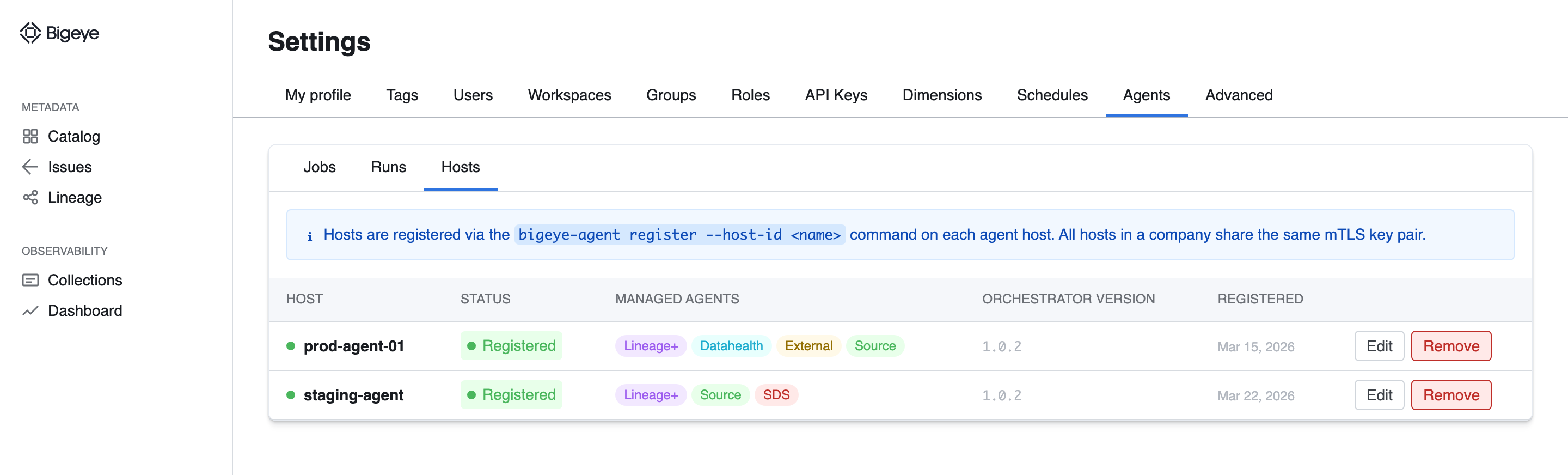
The Hosts tab under Settings → Agents lists every registered host. Representative mockup; the shipped UI may differ.
Updated 5 months ago