

Migrating to the Agent Orchestrator
Register an existing host so Bigeye can orchestrate its batch agent jobs
This guide walks an existing Bigeye agent host through registering with the Agent Orchestrator so Bigeye can run that host's batch agent jobs — Lineage Plus, DataHealth, and External Monitors — on demand, instead of you triggering them with per-agent commands or cron.
Current availabilityOrchestration is available today for batch agents only: Lineage Plus, DataHealth, and External Monitors. This is the completed first phase of the orchestrator.
Lifecycle management of the persistent agents (Data Source, SDS, Cross-Source) through the orchestrator is in progress and not yet available. Continue to run and manage those agents with their existing per-agent commands — registering a host does not put them under orchestration.
Migration is non-destructive: your bigeye_agent.yml, connectors, and mTLS keys are reused. It is also opt-in — a host keeps working exactly as it does today until you run bigeye-agent register.
Who should migrate
| You run | Migrate now? | Notes |
|---|---|---|
| Batch agents (Lineage Plus, DataHealth, External Monitors) | Yes | Register so Bigeye can dispatch their jobs to this host. |
| Only persistent agents (Data Source, SDS, Cross-Source) | Not yet | The orchestrator doesn't manage these yet. Keep using their per-agent commands and revisit once persistent-agent orchestration ships. |
| Kubernetes host | Not supported | The orchestrator runs as a Docker Compose stack; Kubernetes hosts can't register. |
Your bigeye_agent.yml, connectors, and agent configuration all carry over. Persistent agents you've already installed keep running and stay under your control — the orchestrator does not start, stop, or upgrade them.
Prerequisites
Complete the orchestrator Prerequisites before migrating — most importantly:
- Docker Compose V2 (
docker compose versionreportsv2.x.x). - Docker usable without
sudo— the user runningbigeye-agentmust be in thedockergroup (or use rootless Docker). The orchestrator never runs Docker withsudo; if your host currently relies onsudo docker, fix this first or the orchestrator cannot start or manage containers. - A Bigeye Personal API Key for an Admin user (
registerrejects non-admin keys).
Migration-specific preparation:
- Back up your configuration. Copy
bigeye_agent.ymland the entireagent_config/directory (it holds your mTLS keys) somewhere safe before you start. - Pick a host id — a stable, unique, human-readable name for this host (alphanumeric + hyphens, ≤256 chars), e.g.
prod-agent-01. It identifies the host to Bigeye and cannot collide with another registered host on the account.
Migration steps
Run all commands from the directory that contains your bigeye_agent.yml.
1. Verify Docker access
docker compose version   # must be v2.x.x
docker ps                # must succeed WITHOUT sudo
If docker ps only works with sudo, add your user to the docker group and start a new login session before continuing:
sudo usermod -aG docker $USER
# log out and back in (or run `newgrp docker`), then re-check `docker ps`
2. Register the host
./bigeye-agent register --host-id prod-agent-01On a host that already has a bigeye_agent.yml, register:
- Reuses the existing mTLS keys in
agent_config/(it does not regenerate them). - Registers the host and its installed agent set with Bigeye so batch-agent jobs can be dispatched here.
- Enables Docker Compose mode (
docker_compose_enabled: true) inbigeye_agent.yml. - Regenerates
docker-compose.bigeye.ymlwith the orchestrator anddocker-socket-proxyservices (on an isolatedorchestrator-internalnetwork) and starts the orchestrator stack.
If this host also runs persistent agentsThe orchestrator stack runs under Docker Compose, but the orchestrator does not manage persistent agents (Data Source, SDS, Cross-Source) yet — keep starting, stopping, and upgrading them with their per-agent commands. While persistent-agent orchestration is still in development, hosts dedicated to batch agents are the simplest to register.
3. Verify the migration
Confirm the orchestrator is running:
./bigeye-agent compose statusYou should see bigeye-agent-orchestrator and docker-socket-proxy running (plus any long-running agent services already configured on the host).
Check that the orchestrator connected to Bigeye:
./bigeye-agent compose logs -s bigeye-agent-orchestratorLook for the Temporal worker starting and a successful heartbeat to Bigeye. The host should also appear in your account's orchestrator host list in Bigeye.
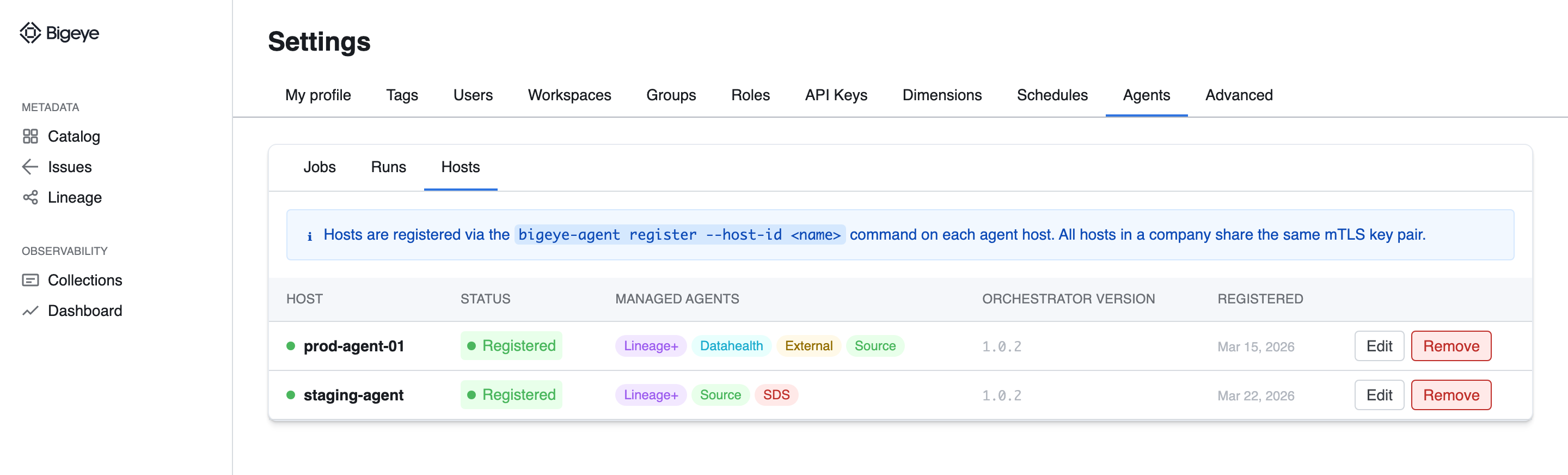
After migrating, the host appears in the Hosts tab under Settings → Agents. Representative mockup; the shipped UI may differ.
After migration
- Batch jobs run on demand. Lineage Plus, DataHealth, and External Monitors jobs are triggered by Bigeye and executed on this host — you can retire the local cron entries or manual
lineage run/datahealth runinvocations that drove them. See Creating & Managing Agent Jobs. - Persistent agents are unchanged. Data Source, SDS, and Cross-Source are not orchestrated yet — keep starting, stopping, and upgrading them with their per-agent commands. Orchestrated lifecycle management for these is planned for a later phase.
- Observe the orchestrator with
compose statusandcompose logs -s bigeye-agent-orchestrator. - Keep the host in sync.
bigeye-agent installandbigeye-agent synccontinue to work; on a registered host they also regenerate the compose files and push the updated agent set to Bigeye automatically. - Upgrade the orchestrator with
bigeye-agent compose upgrade.
See the Registering a Host page for the full command reference and the security boundary details.
Migrating additional hosts
mTLS keys are shared across all orchestrator hosts on a Bigeye account. To bring a second host under orchestration:
- Copy the entire
agent_config/directory from an already-registered host to the new host. - Run
bigeye-agent register --host-id <unique-name>on the new host.
Registering on a host that has no agent_config/ while other orchestrator hosts already exist fails with an error directing you to copy the directory first.
Rolling back
There is no CLI command to undo a migration; roll back manually:
-
Stop the orchestrator stack:
./bigeye-agent compose down -
Restore the
bigeye_agent.ymlyou backed up (which hasdocker_compose_enabledunset and noorchestratorsection), or setdocker_compose_enabled: falseand remove theorchestrator:block. -
Restart agents using your previous method (per-agent
startcommands, orcompose upif you were already on Docker Compose mode).
The host record remains registered with Bigeye until it's removed server-side; contact Bigeye support if you need it deregistered.
Troubleshooting
- "Docker Compose mode is not enabled" when running
composecommands — re-runbigeye-agent register; it sets and persistsdocker_compose_enabled: true. registeraborts on the Docker Compose check — install Docker Compose V2 (docker compose, not the legacydocker-compose) and re-run.- Orchestrator container won't start or can't manage agents — confirm
docker psworks withoutsudofor the user running the CLI. - "Host is already registered" — choose a different
--host-id, or reuse the same id on the host that already owns it.
See the Troubleshooting page for more.
Updated 5 months ago