

May 20, 2026
New Additions
Rules in Scorecards and Collections
Custom rules — including join rules — can now be added to collections and will appear in scorecard pages. Issues for custom rules are now included in issue counts and issue lists for sources, schemas, and tables.
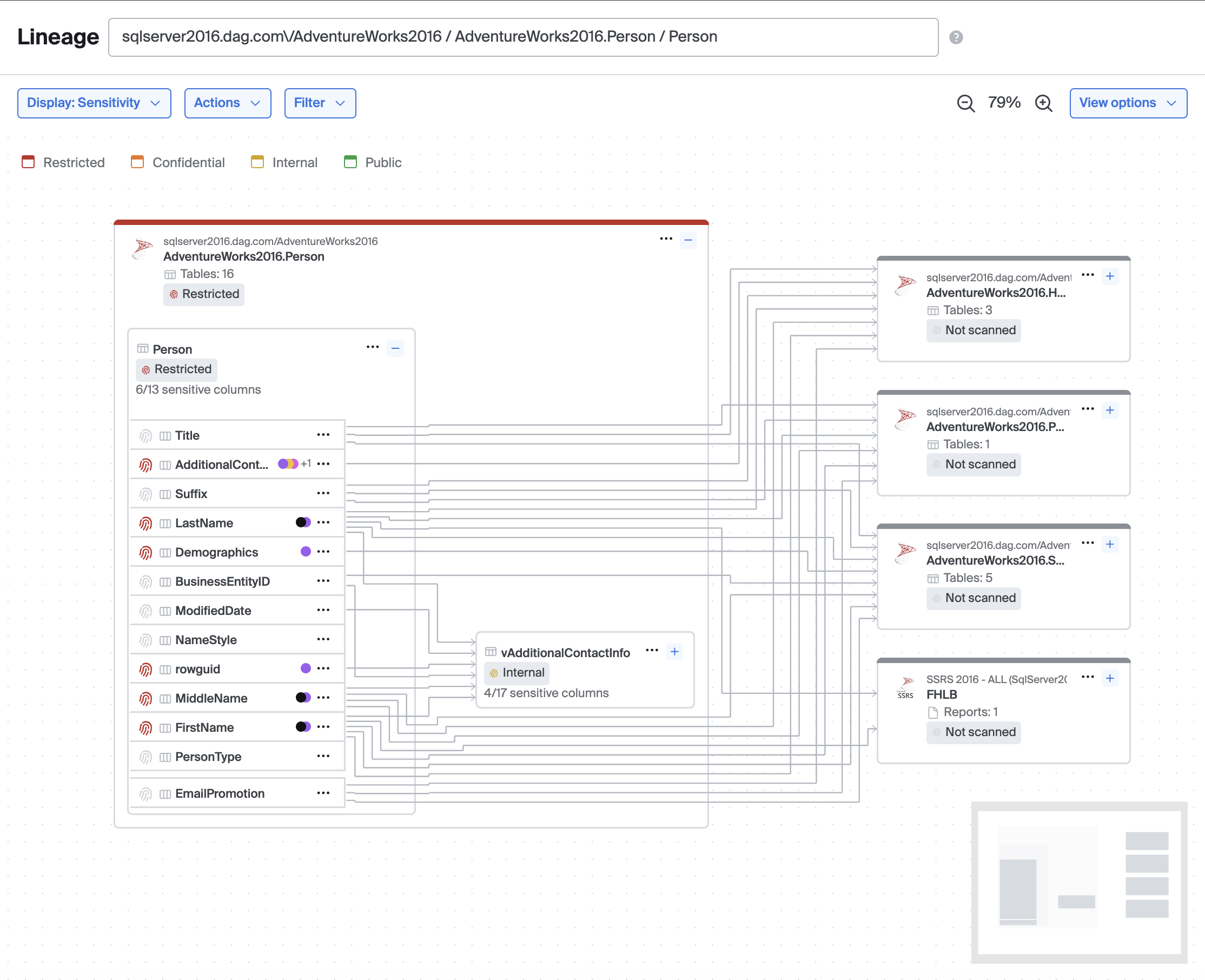
Lineage for Sensitive Data
Lineage now has a display mode for sensitive data scanning. It will show classifications for each node along with other sensitivity information.
Added
Lineage
- Added a "View options" menu in the lineage header consolidating Fit to window, Recenter, Expand all nodes, and Collapse all nodes behind a single button (when the lineage graph view options preview is enabled)
- Added a "Default view" setting in Advanced Settings that lets workspace admins configure the default lineage display mode (Lineage only or Observability) for users who have not yet set their own preference
- Added support for referencing nodes in cross-repository lineage edges using a metacenter UID, enabling lineage between nodes in different custom repositories
Metrics
- Added a "Show metric list sparklines" advanced setting to control whether the metrics list displays sparklines and fetches their data
Sensitive Data
- Added data class categories throughout the UI, with categories included in CSV and PDF exports
- Added a scan run retry modal with support for selecting table partition columns
- Added test detector inputs for ML detectors in the Configure Detectors view
- Added a sensitive data section to source right-hand panes
- Added support for tracking late and missed scheduled scan runs
- Scan jobs and scan runs can now be sorted by schedule
Catalog
- Added the ability to edit and delete custom repositories directly from the catalog detail page
SSO
- Added an endpoint to enable or disable an SSO domain mapping
- Service accounts can now manage SSO endpoints
Updated
Lineage
- Expanding or collapsing nodes and loading more lineage layers no longer resets the zoom level — the graph pans to keep relevant nodes in view while preserving your current zoom
- Lineage graph views (Lineage only / Observability) are now enabled by default for all customers
- Renamed lineage view options: "Simple" is now "Lineage only" and "Issues" is now "Observability"; the menu trigger now reads "Display: <active view>"
- Assumed table edges are now created automatically alongside column-level edges by default, improving lineage performance
- The reorganized node context menu with logical groupings, dividers, and table-specific submenus is now enabled by default for all customers
- The Alerting path filter is now only shown in Observability display mode; switching to another display mode automatically clears it
- The Lineage tab on issue detail pages now shows column-level lineage by default when the issue is triggered by a column-level metric
- Direction filters (upstream/downstream) have been moved into the Filter menu as toggleable switches when the consolidated lineage controls preview is enabled
Service Accounts
- Service accounts are now enabled by default for all customers; "Beta" and "In development" labels have been removed from related advanced settings
Autothresholds
- Volume family metrics now snap negative lower bounds to 1 when recent history is all positive (otherwise 0), reducing false positives on volume metrics
- Bigeye no longer auto-annotates
FALSE_POSITIVEfor early data points in non-backfillable metrics
Sensitive Data
- Aggregate finding PDFs now show scan type
Fixed
Lineage
- Fixed the viewport zooming to the anchor node instead of the focused or highlighted column's table when using focus mode, highlight mode, or loading a page with those modes set in the URL
- Fixed unstyled expand, show more layers, and node menu buttons
- Fixed unstyled circular "Show more upstream/downstream" buttons appearing in the center of the graph
- Fixed pagination controls on entry container nodes shifting upward when a search filter reduced visible columns below the page size
- Fixed a timeout when downloading the lineage graph as CSV for very large lineage graphs
- Fixed expand/collapse buttons sometimes stretching vertically
- Fixed SSIS packages using certain destination types missing from MetaCenter lineage sync
- Fixed the "Deploy metrics" action showing in the lineage node menu and right-hand pane when observability is not enabled
Issues
- Fixed issue counts and issue lists for schemas, sources, and tables including issues from the right side of cross-source join rules
- Fixed a bug where issues for custom rules would not appear until the page was refreshed
- Fixed breadcrumbs for custom rule issues
Catalog
- Fixed an issue where re-discovering a previously deleted schema during indexing did not generate a schema change event
- Fixed search results for BI and ETL tool assets (PowerBI, Tableau, Matillion, etc.) not appearing in the catalog tree
- Fixed Issues tabs showing badge counts but displaying 0 results on entity detail pages
- Fixed the "Add monitoring" button appearing on source, schema, table, and column detail pages when observability is not enabled
Metrics
- Fixed handling of null dimension column values
- Fixed an issue where BigQuery volume metrics could show persistent 0-value data points
- Fixed grouped metric detail rows rendering with inconsistent chart cell heights
- Fixed schedule changes not appearing in the metric timeline
Bigconfig
- Fixed an issue where new metric definitions that shared a target column, filter, and lookback with another definition but had different thresholds were silently omitted from the plan
Notifications
- Fixed a race condition where companion metrics could create two Slack threads for the same issue
- Fixed SQL rule issue emails so the Location row links to the source detail page; added a new SQL Rule row that links directly to the rule
Platform
- Fixed an issue where IDP group memberships were not updated during OIDC SSO token refresh, previously requiring a full re-login for group changes to take effect
Sensitive Data
- Fixed a bug where all sensitive columns in Lineage were showing as 0 out of 0 columns
- Fixed a bug where changing ML detector type in Configure Detectors would silently reset the threshold to the default value
- Fixed column right-hand panes not displaying sensitivity information
Search
- Fixed the search API taking several minutes to respond for workspaces with large numbers of tables or columns
Updated 2 months ago
Did this page help you?