

Registering a Host
Register a host so Bigeye can orchestrate its batch agent jobs
Registering a host is the first step to bringing it under the Agent Orchestrator. bigeye-agent register provisions the orchestrator stack on the host and records the host with Bigeye, after which Bigeye can dispatch batch agent jobs — Lineage Plus, DataHealth, and External Monitors — to it.
register is the primary entry point for orchestrator-driven deployments. It works on a fresh host with no prior bigeye-agent install.
Already running batch agents and want Bigeye to orchestrate their jobs? See Migrating to the Agent Orchestrator.
Prerequisites
The orchestrator runs as a Docker Compose stack and manages other containers on the host. Set the following up before running bigeye-agent register — register will fail fast if Docker Compose is missing, and the orchestrator cannot start or manage agents without non-sudo Docker access.
Docker Engine and Docker Compose V2
- A running Docker Engine.
- Docker Compose V2 — the
docker composeCLI plugin, not the legacy standalonedocker-compose. Install it from the official guide.
Verify before registering:
docker compose version
# Docker Compose version v2.x.x
register runs this check and aborts if Docker Compose V2+ is not found.
Run Docker without sudo
sudoThe orchestrator drives Docker through the docker compose CLI and talks to the Docker daemon directly — it never invokes Docker with sudo. The user that runs bigeye-agent must therefore have non-root Docker access.
Add your user to the docker group and start a fresh login session:
sudo usermod -aG docker $USER
# log out and back in (or run `newgrp docker`), then confirm Docker works without sudo:
docker ps
If docker ps only succeeds with sudo, the orchestrator will not be able to start or manage containers.
Note: Per-agent CLI flows could previously fall back to
sudo dockerwhen the user lacked Docker permissions. The orchestrator and its Compose-based agent management do not supportsudo— non-sudoDocker access is a hard requirement. Rootless Docker is fine as long asdockeranddocker composerun without elevation.
Docker socket
The orchestrator container reaches the Docker API only through a hardened docker-socket-proxy sidecar (see Security boundary below). The host's Docker socket must be present at its default path, /var/run/docker.sock.
Credentials and networking
- A Bigeye Personal API Key belonging to an Admin user and an Agent API Key (see the Installation page).
registerrejects non-admin Personal API Keys. - The host must be able to pull the public
bigeyedata/*images from Docker Hub — no Docker registry login (PAT) is required for orchestrator-managed images. - The host sizing and networking requirements on the Installation page also apply.
Registering a host
./bigeye-agent register --host-id my-host-01If --host-id is omitted, you'll be prompted for one. Host ids must be alphanumeric + hyphens, ≤256 characters.
On a fresh host (no bigeye_agent.yml), register walks through a focused first-time setup:
- Proxy / custom CA prompts (skip if not used)
- Bigeye Personal API Key (must belong to an admin user) and Agent API Key
Kubernetes, secrets-manager, and Docker registry access prompts are intentionally skipped — bigeyedata/* images are public on Docker Hub, orchestrator-driven hosts run on Docker Compose, and secrets-manager integration is opt-in via bigeye-agent configure secrets_manager after registration.
Then register:
- Validates the host id and checks uniqueness via
GET /api/v1/agent-orchestrator/hosts. - Provisions mTLS keys in
agent_config/(if absent) — generates a 4096-bit RSA keypair on the host, registers the public key with Bigeye, and downloads Bigeye's public key for the Temporal codec. - Calls
POST /api/v1/agent-orchestrator/register. - Persists
orchestrator.host_idtobigeye_agent.ymland enables docker compose mode (docker_compose_enabled: true) so thecomposecommands below work. - Regenerates
docker-compose.bigeye.yml(now including the orchestrator + docker-socket-proxy services on an isolatedorchestrator-internalnetwork) and starts the containers.
Once registration succeeds, the host appears in your account's orchestrator host list in Bigeye.
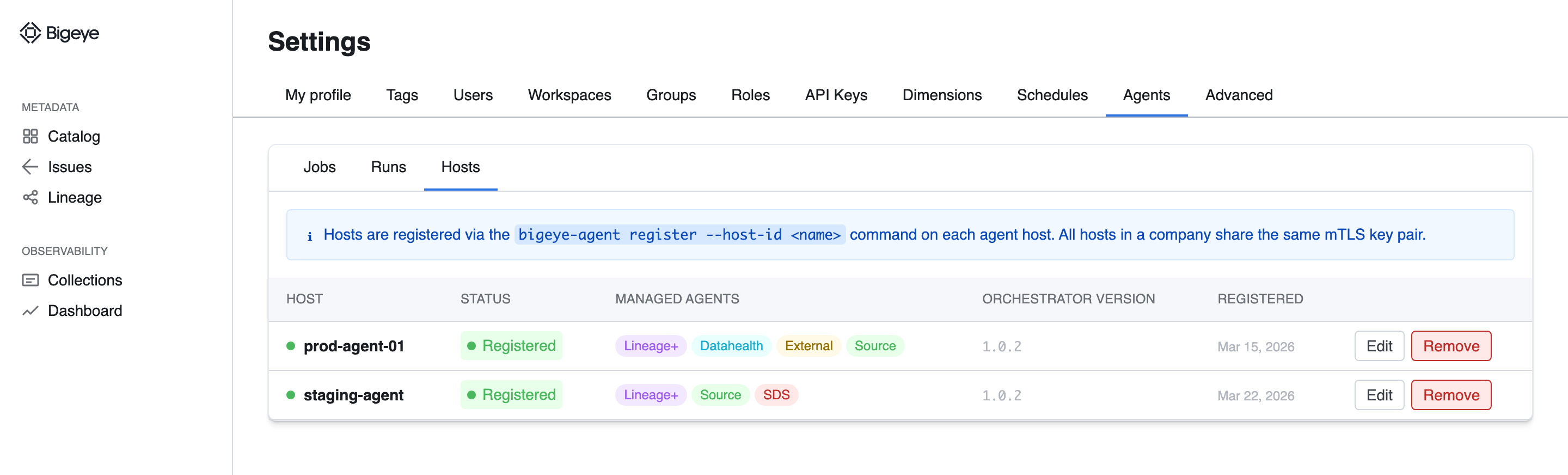
The registered host appears in the Hosts tab under Settings → Agents. Representative mockup; the shipped UI may differ.
Adding additional hosts
To register a second host on the same Bigeye account:
- Copy the entire
agent_config/directory from the first registered host to the new host. mTLS keys are shared across all orchestrator hosts on an account. - Run
bigeye-agent register --host-id my-host-02on the new host.
Running register on a host that already has other orchestrator hosts registered but doesn't have agent_config/ will fail with a clear error pointing you to copy the directory first.
Adding agents to a registered host
Once a host is registered, add agents the usual way:
./bigeye-agent install # pick an agent type from the promptinstall and sync both push the host's current agent set to the orchestrator host record on Datawatch (via POST /api/v1/agent-orchestrator/register with the updated managed_agents list), so Bigeye-side schedules can target the right hosts without operator intervention.
Today this targeting applies to the batch agents (Lineage Plus, DataHealth, External Monitors) — Bigeye dispatches their jobs to the registered host. Persistent agents (Data Source, SDS, Cross-Source) are recorded on the host but are not yet orchestrated; keep starting, stopping, and upgrading them with their per-agent commands until that work ships.
Running the orchestrator service
Once registered, the orchestrator container starts automatically. Manage it with the standard compose commands:
| Command | Description |
|---|---|
compose status | Show status of orchestrator + docker-socket-proxy containers |
compose logs -s bigeye-agent-orchestrator | Tail orchestrator logs |
compose logs -s docker-socket-proxy | Tail socket-proxy logs |
compose upgrade | Pull latest images and recreate services |
compose down | Stop all services (including agents) |
bigeye-agent serve runs the orchestrator service in the foreground — used by the orchestrator container's entrypoint. Operators typically don't invoke it directly.
Security boundary
The orchestrator never mounts /var/run/docker.sock directly. Instead, all Docker API access flows through a docker-socket-proxy sidecar pinned to a minimum allow set (containers, images, info, version, post — everything else is denied). The orchestrator container refuses to start if the on-disk compose file's proxy flag set is modified.
The orchestrator and socket-proxy share an isolated orchestrator-internal Docker network; managed-agent containers run on the standard compose network and never see the socket proxy.
Next steps
With the host registered, you can create and manage agent jobs from Bigeye.
Updated 5 months ago