

Microsoft Purview Lineage Integration
The Bigeye Data Health Agent can replicate the lineage Bigeye knows about into Microsoft Purview, so your warehouse → transformation → BI lineage shows up natively on your Purview assets. This guide walks through everything required to configure and run it.
Status: This integration is in preview. The steps below are accurate for the current release and target unified Microsoft Purview.
Bigeye is the source of truth for lineage.For every source and BI tool you map to Purview, this integration makes Bigeye's lineage
authoritative: on each managed asset, it upserts the lineage Bigeye computes and removes
Bigeye-managed edges Bigeye no longer reports. Disable Purview's own lineage generation
(lineage produced by Purview scans, not the scans themselves) for those assets before your first
sync.
NOTE: Some Purview source types don't allow automatic lineage to be disabled.
Where an asset already carries lineage Bigeye didn't write, expect one of two outcomes:
lineage from a Purview scan coexists with Bigeye's, while a direct lineage edge someone
else created between the same two assets (for example, one drawn in the Purview UI) makes
Bigeye skip its own edge, because Purview allows only one per pair. The run report counts
the skipped edges and lists the existing lineage under Pre-existing (see section 9).
You'll get the cleanest, most predictable result on assets that have no pre-existing lineage.
Each sync targets one Bigeye workspace, scoped to what you map in Purview.A credential syncs a single Bigeye workspace (set by
bigeye_workspace_id), and only
pushes lineage for the sources and BI assets you've mapped in Purview (via the
"Bigeye Object IDs" attributes) — unmapped sources in the workspace are ignored. A dedicated
lineage-only workspace is therefore optional; your Purview mappings, not the workspace,
define what syncs. You can run multiple credentials independently (different workspaces or
different mapped sources), and each syncs only its own mapped assets.
1. What the integration does
- Direction: one-way, Bigeye → Purview. It never writes back to Bigeye.
- What it writes: Purview built-in
direct_lineage_dataset_datasetrelationships between
your assets:- Column-level lineage (a
columnMapping) wherever Bigeye has column-level lineage
(e.g. table → table, table → BI report). - Table-level lineage (no
columnMapping) where Bigeye only has object-level lineage
(e.g. BI report → BI dashboard).
- Column-level lineage (a
- Un-scanned intermediate nodes: if Bigeye knows about one or more ETL nodes (e.g. a
replication task) that Purview has not scanned between two mapped assets, the agent creates a
lightweight placeholder dataset for each hop under the qualified-name prefix
bigeye://lineage/...so the whole source → target chain stays connected. - Idempotent reconcile: each run creates new edges, updates changed ones in place, and
removes edges Bigeye no longer reports. Re-running is safe. Bigeye owns the lineage it
writes — do not hand-edit Bigeye-authored edges in Purview.
How matching works (why you only tag a few assets)
You do not tag every table. The agent resolves assets by searching Purview:
- Tables/views are matched per (source, schema): the agent finds your source-level
asset (tagged with a Bigeye Source ID), then searches for the schema and its tables
underneath it. Tag the source asset once; every table under it is matched automatically. - BI objects (reports, dashboards) are matched through their parent workspace: tag
the BI workspace asset (e.g. afabric_workspace) with a Bigeye DataNode ID, and the
reports/dashboards under it are matched automatically.
The agent never constructs qualified names — it only references assets returned by search.
2. Prerequisites
On the Bigeye side
- A Bigeye API key (or username/password) with access to the workspace you want to sync.
- The workspace ID of the workspace you want to sync. The sync only covers the sources and
BI assets you map in Purview (see the callout above) — not every source in the workspace. - Lineage must already exist in Bigeye. The agent replicates Bigeye's lineage graph; if
Bigeye has no lineage for a source, nothing is written for it.
On the Purview side
- A unified Microsoft Purview account.
- Permission to create an Azure AD app registration and to assign Purview collection roles.
- Your warehouses and BI tools already scanned into Purview (the agent attaches lineage
to assets Purview has discovered). - Purview's own lineage generation disabled where possible for the sources/BI Bigeye will
manage (see the callout at the top) — Bigeye is the source of truth for their lineage. Some
source types don't allow it to be disabled; see the callout for what to expect.
Network egress (the agent must reach, over HTTPS/443):
login.microsoftonline.com— Azure AD token endpoint- Your Purview data-plane endpoint —
https://api.purview-service.microsoft.com - Your Bigeye instance — e.g.
https://app.bigeye.com - Your secret store, if you load the credential from one (AWS/Azure/GCP/HashiCorp)
Host resources
The pre-install checklist sets the agent's baseline at 1 CPU / 2 GB (4 CPU / 16 GB if it shares a host with the Bigeye agent). sync-lineage is the most memory-hungry command the agent runs. Unlike the other sync commands it holds the whole lineage graph in memory for the duration of the run, and the footprint scales with the number of lineage nodes rather than the number of tables. So provision 4 GB if you are syncing lineage for a sources at larger scales; e.g. >= 15,000 tables.
3. Step 1 — Create an Azure AD app registration (OAuth)
The agent authenticates to Purview as a service principal using the OAuth2 client-credentials
flow.
- In the Azure portal → Microsoft Entra ID (Azure AD) → App registrations → New
registration. Give it a name (e.g.bigeye-purview-lineage) and register it. - Note the Application (client) ID and the Directory (tenant) ID.
- Under Certificates & secrets → New client secret, create a secret and copy its
value immediately (you cannot retrieve it later). Note its expiry — you must rotate the
credential before it expires. - Grant the service principal a Purview role. This is the step most often missed. In the
Purview governance portal, open Data Map → Collections (or Roles), select the
collection(s) that contain the assets you want lineage on (use the root collection to
cover everything), and add the app registration as a Data Curator.- Data Curator is required because the agent must read assets and managed attributes
and write lineage relationships (and placeholder datasets). - The agent requests the token scope
https://purview.azure.net/.defaultautomatically;
you only supply the tenant/client/secret.
- Data Curator is required because the agent must read assets and managed attributes
4. Step 2 — Create the "Bigeye Object IDs" managed attributes
The agent finds your Purview assets by reading custom managed attributes (also called
custom/business metadata) that you set on them. Create one attribute group with two attributes.
Using the Bigeye Agent CLI?
bigeye-agent install(choose DATAHEALTH, then PURVIEW)
creates this group for you when the service principal is allowed to define managed attributes,
and walks you through Step 3 interactively. The manual steps below are the fallback when it is
not, or when you prefer to set the attributes in the portal.
Names and types must match exactly — the agent looks them up by these literal names.
-
In Purview, open Unified Catalog → Catalog management → Custom metadata click on the Data asset attributes tab.
-
Create a new attribute group named exactly:
Bigeye Object IDs -
Add two attributes to that group:
Attribute name Type Associated asset types Bigeye Source IDInteger Your source/server asset types (e.g. databricks_metastore,azure_sql_server, Snowflake/Oracle server types)Bigeye DataNode IDInteger Your BI workspace asset type (e.g. fabric_workspace)- The type must be Integer — the agent matches on the numeric value.
- "Associated asset types" must include the asset types you intend to tag in Step 3,
otherwise the attribute can't be set on (or read from) those assets. - If you have multiple asset types, you can simply use
Assetunder Atlas Core
5. Step 3 — Map Bigeye IDs onto Purview assets
For each source and BI workspace you want lineage for, set the managed attribute on the
corresponding Purview asset.
Sources (warehouses):
-
Find the Bigeye Source ID — the numeric ID of the warehouse/source in Bigeye. You can
retrieve it from the Bigeye API (GET {bigeye_base_url}/api/v1/sources) or from the
source's page URL in the Bigeye app. -
In Purview, open the source/server-level asset for that warehouse (not an individual
table) and setBigeye Object IDs → Bigeye Source IDto that number.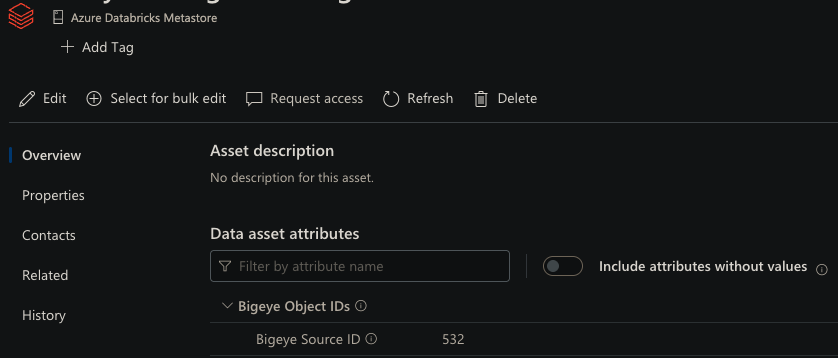
BI workspaces:
-
Find the Bigeye DataNode ID for the BI tool from the Lineage section of Bigeye —
not from the lineage tab of a linked table. Navigate to the BI tool's node in the
Lineage view; the node ID appears in the page URL.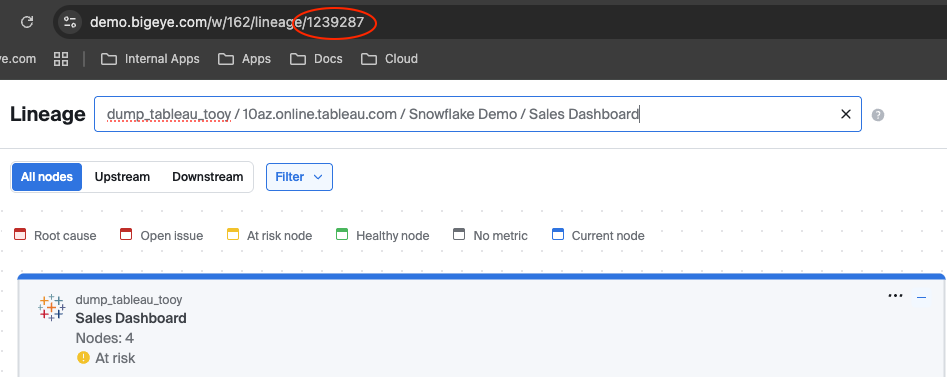
-
In Purview, open the BI workspace asset (e.g. the
fabric_workspace) and set
Bigeye Object IDs → Bigeye DataNode IDto that number.
BI lineage requires a mapped warehouse source. Syncing BI tools on their own isn't
supported yet — BI lineage is replicated only where it connects to a warehouse source you've
mapped. Be sure to map the relevant warehouse source(s) as well.
You only need to tag the source-level and workspace-level assets — tables, reports, and
dashboards under them are matched automatically (see How matching works above).
Mapping defines the sync's scope. The integration only creates lineage for the sources
and BI workspaces you map here. Sources you don't map are ignored, and lineage that only
routes through an unmapped source (for example, a table in an unmapped warehouse sitting
between two mapped tables) is dropped rather than bridged. To narrow a sync, map fewer
sources; to widen it, map more.
6. Step 4 — Build the credential
The credential is a single object you can provide as a JSON file or store in a
secret manager. Fields:
| Field | Required | Default | Notes |
|---|---|---|---|
bigeye_base_url | yes | — | e.g. https://app.bigeye.com. |
bigeye_api_key | yes* | — | API key for Bigeye. (*or bigeye_username + bigeye_password.) |
bigeye_workspace_id | yes | Workspace to sync. | |
verify | no | true | TLS verification (true/false, or a CA bundle path). |
purview_tenant_id | yes | — | Azure AD directory (tenant) ID. |
purview_client_id | yes | — | App registration (client) ID. |
purview_client_secret | yes | — | App registration client secret. Supports ${ENV_VAR} (read from environment). |
purview_base_url | no | https://api.purview-service.microsoft.com | Unified Microsoft Purview data-plane endpoint; the default is correct for most accounts. |
purview_scope | no | https://purview.azure.net/.default | Azure AD token scope; the default is correct for unified Purview. |
purview_api_version | no | 2023-09-01 | Purview Data Map API version. |
purview_tenant_id,purview_client_id, andpurview_client_secreteach support
${ENV_VAR}substitution — e.g. setpurview_client_secret: ${PURVIEW_CLIENT_SECRET}and
provide the value via an environment variable instead of in the file.
Example (purview-config.json):
{
  "bigeye_base_url": "https://app.bigeye.com",
  "bigeye_api_key": "<your-bigeye-api-key>",
  "bigeye_workspace_id": 123,
  "purview_tenant_id": "00000000-0000-0000-0000-000000000000",
  "purview_client_id": "11111111-1111-1111-1111-111111111111",
  "purview_client_secret": "someclientsecret"
}
7. Step 5 — Run sync-lineage
sync-lineageDownload datahealth-integration-docker-compose.yaml as docker-compose.yaml and create the necessary directory with credential file above. The commands below show how to run the sync via Docker compose
wget https://bigeye-public-web.s3.amazonaws.com/datahealth-integration-docker-compose.yaml --output-document=docker-compose.yaml

mkdir bigeye_datahealth_config
touch bigeye_datahealth_config/purview-config.json
From a local file:
docker compose run --rm datahealth-integration sync-lineage --file-name purview-config.jsonFrom AWS Secrets Manager:
docker compose run --rm datahealth-integration sync-lineage --aws-secret-name my/purview/cred --aws-region us-west-2From Azure Key Vault:
docker compose run --rm datahealth-integration sync-lineage \
  --azure-secret-name my-purview-cred \
  --azure-vault-url https://my-vault.vault.azure.net/
From GCP Secret Manager:
docker compose run --rm datahealth-integration sync-lineage --gcp-secret-name my-purview-cred --gcp-project-id my-projectFrom HashiCorp Vault:
docker compose run --rm datahealth-integration sync-lineage \
  --hashicorp-vault-url https://vault.example.com \
  --hashicorp-secret-path secret/data/bigeye/purview \
  --hashicorp-token <token>
Tuning the lineage crawl (optional):
Reading the lineage graph is the longest part of the sync — one request per lineage node, and a
large source has tens of thousands. Two optional settings control it, each available as a flag or
an environment variable.
| Option | Environment variable | Default | What it does |
|---|---|---|---|
--lineage-crawl-workers | BIGEYE_LINEAGE_CRAWL_WORKERS | 8 | Lineage requests made concurrently. Set to 1 to disable concurrency entirely. |
--max-unreadable-nodes | BIGEYE_LINEAGE_MAX_UNREADABLE_NODES | 0 | How many lineage nodes may fail to be read before the run is treated as incomplete and fails. |
docker compose run --rm datahealth-integration sync-lineage \
  --file-name purview-config.json \
  --lineage-crawl-workers 8
An incomplete read fails the run rather than deleting lineage.
--max-unreadable-nodesdefaults to0deliberately. Because each run removes Bigeye-authored edges that Bigeye no longer reports, a crawl that quietly missed part of the graph would delete real lineage from Purview. Failing is the safer outcome, so by default a single lineage node that cannot be read after retries stops the sync before anything is written.Transient failures are retried automatically and rarely reach this point, and lineage nodes that
no longer exist are skipped and never count toward the limit. Raise the value only if you would
rather a run complete than stop — accepting that lineage for the unread nodes is removed from
Purview.
Saving the full run report (optional):
Every run ends by logging a run report (see the sample output below). The logged report keeps it
short: unresolved schemas and pre-existing lineage are listed but cut off after 20 entries, and
unmapped sources, unmatched tables, and unmatched BI objects appear only as counts. To keep the
complete detail, write the report to a JSON file:
| Option | Environment variable | Default | What it does |
|---|---|---|---|
--report-file | BIGEYE_LINEAGE_REPORT_FILE | none | Path to write the full run report to, as JSON. |
docker compose run --rm datahealth-integration sync-lineage \
  --file-name purview-config.json \
  --report-file /app/config/purview-lineage-report.json
Write the report under
/app/config. The path is inside the container, and Compose mounts
only./bigeye_datahealth_config(as/app/config). A report written anywhere else is lost when
the container exits. The example above lands at
./bigeye_datahealth_config/purview-lineage-report.jsonon the host. If you run the image with
docker runinstead, mount a directory (not just the credential file) and write the report into it.
What to expect:
- The file is written once the sync completes, and the log confirms it:
Wrote the full Purview lineage report to <path>. - Each run overwrites the file. To keep a history, put the date in the name, e.g.
--report-file /app/config/purview-lineage-report-$(date +%F).json. - A run that fails (for example, on an incomplete lineage read) writes no report, so a file left by
an earlier run is unchanged. Check the file's modified time before reading it. - If the path can't be written, the agent logs a warning and the sync still succeeds.
- See Reading the run report for what each part means.
A successful run logs its progress and ends with the run report:
Skipping 40 of 9,000 table(s) that have no lineage node yet; there is nothing to crawl for them until indexing creates one.
Retrieving lineage from 3 sources...
Lineage crawl wave 1: 8,960 node(s) to fetch.
Lineage crawl complete: 13000 nodes built over 3 waves and 13000 fetches in 957.9s (seeds dropped: 0, not found: 0, unreadable: 0, peak RSS: 458MB)
Resolved 3 source(s) and 1 BI object(s) to Purview assets.
Matched 8975 node(s) to Purview entities.
Reconciling 12410 Bigeye lineage edge(s) in Purview...
==============================================================================
Purview lineage sync report — Bigeye workspace 123
==============================================================================
Scope         3 of 4 Bigeye sources mapped in Purview (1 unmapped, skipped)
Matching      schemas 41 resolved / 0 unresolved · tables 8,953 matched / 7 unmatched · BI 22 / 3
Edges         12,410 desired -> 12,410 created, 0 updated, 0 unchanged, 0 deleted, 0 failed
Skipped       35 edges (endpoint unmatched) · 0 (ETL chain dead-ends) · 0 (pre-existing lineage)
Pre-existing  none found on the objects Bigeye matched
Placeholders  12 created, 0 swept
Not checked   10 objects were never matched in Purview, so their pre-existing lineage could not be checked
==============================================================================
8. Scheduling
Run sync-lineage on a batch schedule (hourly/daily is typical) using whatever scheduler runs
the container in your environment — for example a Kubernetes CronJob, an ECS scheduled task,
or cron invoking the Docker image:
# Example cron entry (daily at 02:00)
0 2 * * * docker run --rm \
  -e PURVIEW_CLIENT_SECRET=*** \
  -v /etc/bigeye/purview-config.json:/config.json \
  <bigeye-datahealth-agent-image> sync-lineage --file-name /config.json
9. Verify it worked
- Check the run log for the summary above.
Resolved N source(s) / M BI object(s)confirms
your managed-attribute tags were found. - In Purview, open a table under a tagged source (or a tagged BI report) and view its
Lineage tab — you should see the Bigeye-derived upstream/downstream edges, with
column-level mapping where Bigeye has it.
Reading the run report
The report at the end of each run covers what the sync wrote and everything it chose not to
write. Skipped lineage leaves no trace in Purview, so the report is the only place to see it.
| Row | What it tells you | What to do |
|---|---|---|
| Scope | How many of the workspace's Bigeye sources are mapped in Purview (tagged with a Bigeye Source ID). Unmapped sources are skipped. | Tag a source's asset to bring it into scope. |
| Matching | Schemas resolved / unresolved, tables matched / unmatched, and BI objects as BI <matched> / <unmatched>. Unresolved schemas are listed beneath the row. | An unresolved schema drops every table under it; check that its name matches Purview. A high unmatched BI count usually means BI workspaces aren't tagged. |
| Edges | The edges Bigeye wanted, and what the run did with them: created, updated in place, unchanged, deleted (Bigeye no longer reports them), or failed. | Each failure is also logged as an error. |
| Skipped | Edges not written, by reason: an endpoint didn't match in Purview; an ETL chain never reached a mapped table; or Purview already holds a direct lineage edge between the same two objects. | For unmatched endpoints, see Matching. For pre-existing lineage, see the next row. |
| Pre-existing | Lineage on synced objects that Bigeye didn't author, split into direct (created by a person or another tool, e.g. drawn in the Purview UI) and process-derived (produced by a Purview scan). Edges that blocked one Bigeye wanted come first, marked [Bigeye wanted this edge]. | Purview allows only one direct lineage edge between two objects, so Bigeye leaves these alone. To have Bigeye manage such an edge, delete the existing one in Purview; the next run creates Bigeye's. |
| Placeholders | Placeholder datasets created for ETL hops, and stale ones removed. | Nothing; informational. |
| Not checked | Objects that never matched in Purview, so their existing Purview lineage couldn't be checked. | Nothing; this shrinks as more objects match. |
What's in the report file
The report file holds the same report with nothing cut off. Edges written are counted, not
listed; the lists cover what didn't match, what failed, and the lineage Bigeye found but didn't
author.
| Field | Contents |
|---|---|
workspace_id | The Bigeye workspace synced. |
sources_total, sources_mapped, unmapped_sources | Sources in the workspace, how many are mapped, and each unmapped one as <name> (Bigeye source <id>). |
schemas_resolved, unresolved_schemas | Schemas found in Purview, and each one that wasn't as <schema> (under <source qualified name>). |
tables_matched, unmatched_tables | Tables and views matched in Purview, and each one that wasn't as <schema>.<table> (Bigeye source <id>). |
tables_without_mapped_source | Tables reached by lineage whose source isn't mapped, in the same format. |
bi_matched, unmatched_bi_objects | BI objects matched, and each one that wasn't as <name> (Bigeye node <id>, parent <id>). The parent is the ID the sync looks for as the Bigeye DataNode ID on the BI workspace. |
edges_desired, edges_created, edges_updated, edges_unchanged, edges_deleted | Edge counts. |
edge_failures | Each edge that failed, as <source guid> -> <target guid>: <error>. |
edges_skipped_unmatched_endpoint, etl_chains_dropped, edges_skipped_pre_existing | Edges not written, counted by reason. |
pre_existing_lineage | Every lineage edge on a synced object that Bigeye didn't author (see below). |
placeholders_created, placeholders_deleted | Placeholder datasets created and removed. |
Each pre_existing_lineage entry describes one edge:
object_qualified_name,object_guid: the synced object.other_qualified_name,other_guid: the object at the other end.direction:downstreamwhen the synced object is the edge's source,upstreamwhen it's the
target,unknownwhen the relationship couldn't be read.kind:directorprocess-derived, as in the logged report.relationship_type: the Purview relationship type.created_by: the edge's author as Purview records it.other_is_managed:truewhen the other end is also a synced object.overlaps_desired_edge:truewhen Bigeye wanted an edge between the same two objects and
skipped it because this one exists.
Why didn't an edge sync?
Look up both ends of the missing edge in the report file:
- A table in
unmatched_tables,unresolved_schemas, ortables_without_mapped_source: the
table side never matched. Align the schema or table name with Purview, or tag its source. - A BI object in
unmatched_bi_objects: compare itsparentID with the
Bigeye DataNode IDvalues set in Purview. If no BI workspace carries that ID, tag the
workspace with it. If one does, the object's name in Bigeye doesn't match any asset's name in
that Purview workspace. - An entry in
pre_existing_lineagewithoverlaps_desired_edge: true: Purview already has a
direct lineage edge between the two objects. See the Pre-existing row above. - Neither end listed: both ends matched. Check
edge_failures, and confirm that Bigeye shows
lineage between the two objects.
10. Troubleshooting
| Symptom (log line / error) | Likely cause | Fix |
|---|---|---|
API returned 401 unauthorized | Token invalid / client secret expired | Rotate the client secret; confirm tenant/client/secret are correct. (The agent auto-refreshes tokens, so a persistent 401 means a credential problem.) |
API returned 403 authentication failed | Service principal lacks a Purview role | Assign Data Curator on the relevant collection(s) (Step 1.4). |
No Bigeye sources are mapped in Purview (the run stops) | No source asset carries a readable Bigeye Source ID | Confirm the Bigeye Object IDs group + Bigeye Source ID exist, are Integer, are applicable to the asset type, and are set on the source-level asset. |
Run report: Scope … (N unmapped, skipped) | Those sources' assets aren't tagged | Expected for sources you don't want synced. Otherwise set Bigeye Source ID = <id> on the source asset in Purview; the report file's unmapped_sources lists each one by name and ID. |
No Purview schema found for '<schema>' under <server> / N schema(s) could not be resolved in Purview | The schema name in Bigeye differs from Purview | Align the schema name, or confirm the schema was scanned into Purview under that source. |
Run report: BI <matched> / <unmatched> with many unmatched | The BI objects' workspaces aren't tagged | Set Bigeye DataNode ID on each BI workspace asset. The report file's unmatched_bi_objects gives each object's parent ID, which is the value to set. If that parent is already tagged, the object's name differs between Bigeye and Purview. |
Run report: N edges (endpoint unmatched) | One end of each edge didn't match (untagged source or workspace, or a name mismatch) | Expected for partially tagged environments. To trace a specific edge, see Why didn't an edge sync? in section 9. |
Run report: N (pre-existing lineage) | Purview already holds a direct lineage edge between the same two objects | Bigeye leaves it alone, because Purview allows only one direct lineage edge per pair. To have Bigeye manage it, delete the existing edge in Purview; the next run creates Bigeye's. |
Lineage crawl could not read N node(s), more than the 0 allowed | Bigeye returned repeated errors for some lineage nodes | Nothing was written — the run stops rather than sync a partial graph (see Step 5). Re-run first; transient failures usually clear. If it persists, raise --max-unreadable-nodes to let the run finish, accepting that lineage for those nodes is removed from Purview. |
Skipping N of M table(s) that have no lineage node yet | Those tables haven't been indexed in Bigeye yet | Expected, not an error — a table has no lineage node until Bigeye indexes it, and it syncs on a later run. A count that grows every run means Bigeye indexing is falling behind. |
11. Limitations & behavior to expect
- One-directional — Bigeye → Purview.
- Requires existing Bigeye lineage and scanned Purview assets to connect to.
- Reconcile deletes Bigeye-authored edges that are no longer reported, and prunes stale
bigeye://lineage/...placeholder nodes. Don't manually edit Bigeye-authored lineage in
Purview — it will be overwritten on the next run. - An incomplete read fails the run instead of deleting lineage. Because reconcile removes edges
Bigeye no longer reports, a crawl that silently missed nodes would delete real lineage. If more
than--max-unreadable-nodes(default0) nodes can't be read after retries, the run fails
having written nothing. Transient failures are retried automatically and rarely reach this point. - Newly added tables sync on a later run — a table has no lineage node until Bigeye indexes it.
Those tables are counted in the log and skipped until then. - Schema/object names that differ between Bigeye and Purview cause those edges to be skipped
(counted in the run report) rather than mismatched. - Scoped to what you map — only the sources and BI assets mapped in Purview are synced;
unmapped sources, and lineage that only routes through an unmapped warehouse table, are
excluded (the dropped edges are counted in the run report). - BI-only sync isn't supported yet. The sync seeds from mapped warehouse sources, so a
BI workspace's lineage is replicated only where it connects to a mapped warehouse source. You
must map at least one warehouse source; mapping only BI workspaces won't sync any lineage. - ETL chains become placeholder datasets — lineage flowing through one or more ETL nodes
Purview hasn't scanned is reconstructed as a chain ofbigeye://lineage/...placeholder
datasets, one per hop, so the source → target path stays connected. - Where Purview auto-lineage can't be disabled, lineage from Purview scans coexists with
Bigeye's. Where a direct lineage edge someone else created already links two assets, Bigeye
skips its own edge and the run report lists it under Pre-existing. See the source-of-truth
callout at the top.
Updated 19 days ago