

Bigeye Platform Release Notes
Detailed release notes from the Bigeye platform
Changelog
All notable changes to the Bigeye platform will be documented in this file.
The format is based on Keep a Changelog, and this project adheres to Semantic Versioning.
[2.105.0] - 2026-10-29
- [Agent Trust] Fixed columns getting cut off on the conversation list
- [Catalog] Hiding or showing schemas without the required permission now fails with a clear permission error
- [Lineage] Fixed an issue where Lineage Plus syncs added nodes from repositories excluded from copying to other repositories' lineage
- [Settings] Fixed an issue where Select all on the Users list selected every account instead of only the accounts matching the search
- [API] Removed the
GET /api/v1/agent/validate/source/{id}endpoint; to validate a source connection, usePOST /api/v1/sources/validate - [Catalog] Removed the data profiling feature flag — profiling is now always on
- [Lineage] Removed the "Hide nodes" Advanced Settings flag
- [Agent Trust] Claude Code conversations no longer count the Claude desktop app's own interface actions (such as task-list and session updates) as tool calls or list them under data accesses
- [Notifications] Customizable notifications are now enabled by default
[2.104.0] - 2026-10-27
- [UI] Added an object type dropdown to the Create Policy modal, allowing policies to be created for conversations in addition to AI agents
- [Agent] Fixed SQL Server sources that use a Kerberos ticket cache failing to connect after the ticket expires; tickets refreshed on the agent host are now picked up without restarting the agent
- [Agent] Fixed cross-source join rules failing to read data from SQL Server sources that use a per-source Kerberos ticket cache
- [Dashboard] Fixed the daily dashboard refresh sometimes running hours late
- [Lineage] Fixed the lineage sensitivity view showing "0/N sensitive columns" on tables where the user can't view data classification findings; the label is now left off
- [Platform] When evaluating access decisions with the policy flag enabled, the overall decision is now determined solely by the policy engine result (DENY if any policy matched, ALLOW otherwise), disregarding any prior attribute-based signals such as open issues or sensitive data findings
[2.103.0] - 2026-10-22
- [Catalog] Searching for a tag name now returns the tables, columns, schemas, and lineage nodes tagged with it
- [Platform] Access decision requests now support an
evaluate_policyflag to receive policy evaluation results synchronously in the response, rather than asynchronously - [API] Fixed
POST /api/v1/query/countsreturning a server error for monitor and custom rule counts when the request omitted the group-by - [API]
POST /api/v1/query/countsnow rejects the unspecified and dimension aggregate fields, which it never counted, with a 400 instead of a server error - [Catalog] Fixed custom repository items on a tag's detail page not showing their breadcrumbs
- [Catalog] Fixed custom repository items on a tag's detail page showing the repository name in their type label, to match search results
- [Catalog] Fixed the catalog explorer sidebar briefly appearing collapsed and then opening when the catalog loads
- [Dashboard] The "Export billable tables" button is now only shown to admins, the only users allowed to export
- [Dashboard] The "Export billable tables" button now shows a loading state while the CSV is prepared and shows an error message if the export fails
- [Issue] Fixed an authorization issue in the issue root-cause analysis API
- [Lineage] Fixed MetaCenter Custom Data Mapping syncs stalling on repositories with complex stored procedures, which also blocked the integration's other repositories from syncing
- [Lineage] Fixed slow custom repository syncs for large repositories when custom attributes don't change between syncs
- [Lineage] Fixed source lineage runs reporting success when a batch of schemas failed early in the run, which could leave lineage silently out of date for those schemas
- [Lineage] Fixed table-level lineage from custom repositories being incomplete until the repository synced a second time
- [Lineage] Fixed table-level lineage remaining after the column-level lineage it came from was removed from a custom repository
- [Lineage] Fixed the lineage monitoring view failing when the graph reaches into a workspace the user isn't a member of; those nodes now show no counts
- [Lineage] Improved custom repository sync performance when lineage hasn't changed
- [Metrics] Fixed an issue where changing a freshness or volume metric's name or description through bulk edit or the API also renamed its paired volume or freshness metric
- [Monitoring] Rules managed by Bigconfig no longer appear among metrics or count twice in monitor totals, their issues are grouped and filtered as custom rules, and they now move with their dimension when dimensions are merged
- [UI] Fixed bigAI chat showing an error when reopening a conversation that has expired. It now starts a new chat instead
- [Data Classification] Scan job, classifier, data class and findings counts now require data classification to be enabled and the data classification read permission, matching the data classification pages
- [Lineage] The lineage sensitivity view now shows findings only where data classification is enabled and the user has the data classification read permission
[2.102.0] - 2026-10-20
- [Agent Trust] Added a confirmation toast when verifying or rejecting an evidence report
- [SDS] Sampled scans can now be limited by row count in addition to percentage
- [Agent Trust] Removed the redundant "Generating" action button on evidence reports — the status badge already shows generation progress
- [Catalog] Fixed an issue where saving or syncing a very long catalog attribute value containing non-English characters or emoji could fail
- [Catalog] Fixed catalog attribute rows in the side panel growing taller once a number, date, text, markdown, or URL value was saved
- [Catalog] Multi-select catalog attributes now show each value as a pill with an "Add value" button, aligned with the attribute name
- [Catalog] People catalog attributes now show each person as a pill with an "Add value" button, and typed email addresses can be added from the dropdown
- [Catalog] Snowflake semantic views are no longer indexed as regular views, so metrics are no longer created on them and then fail with "Invalid metric expression"
- [Dashboard] Fixed an issue where tables with full data quality monitoring were also being counted in the metadata-monitored tables metric, which could cause over-reporting on the dashboard
- [Lineage] Fixed MetaCenter lineage runs stopping for all repositories when one repository failed, which could leave lineage out of date for repositories that were never reached
- [Lineage] Fixed lineage imports and custom repository syncs intermittently failing with a "Timed out waiting to write catalog attributes" error
- [Lineage] SSIS Execute SQL Tasks and Data Flows inside Sequence or Foreach Loop containers now each get their own node, with their destinations shown under the correct task
- [Metrics] Fixed an issue where a running metric would stop showing as Running after a few minutes, even though the run was still in progress
- [Metrics] Fixed autothresholds setting a lower bound of 0 on metrics whose values are negative, such as a min or average over a column that holds negative numbers, which left the lower bound above the upper bound and put the metric permanently out of bounds
- [Metrics] Fixed an issue where freshness and volume metrics could intermittently fail together with a SQL compilation error
- [UI] Fixed button icons and labels appearing vertically misaligned, most noticeably in Firefox
[2.101.0] - 2026-10-16
- [Agent Trust Hub] Cortex Code sessions are now synced from Snowflake, including ones that don't run through a Snowflake agent. Each Cortex Code surface (CLI, Desktop and Snowsight) appears as its own agent, with one conversation per session and one turn per prompt that holds the agent's full reply. Conversations show tokens and cost, and the tables and columns the agent queried are recorded as data access
- [Agent Trust] Agent quality scores and conversation details now include pipeline reliability (freshness and volume) issues on the tables an agent reads, with each table listed above its accessed columns
- [Agent Trust] Fixed an issue where an AI agent sync could report success while saving none of its agent activity when a single recorded data access was too large to store
- [Agent Trust] Fixed an issue where large data accesses, such as a query touching many tables or a long web-fetch prompt, were missing from agent conversations
- [Notifications] Webhook and external ticket endpoints that respond with any 2xx status, including 204 No Content, are now treated as successful
- [Notifications] Testing a webhook that rejects the request with HTTP 400 now reports the status code in the error message
[2.100.0] - 2026-10-13
- [Notifications] Added
{{monitorOwnerName}}and{{monitorOwnerEmail}}variables to custom notification templates, which show the name and email address of the metric's owner - [Catalog] Fixed an issue where saving a catalog attribute with an invalid key, such as one starting with the reserved "bigeye." prefix, failed without explaining why
- [Issues] Fixed an issue where acknowledging, closing, or reopening an issue could be silently undone a few seconds later
- [Platform] Access controls for AI chat are now enforced consistently across all chat endpoints
- [Dashboard] Agent Cost Dashboard is now available whenever AI Guardian is enabled (previously behind a separate preview toggle)
- [Agent Trust] Replaced the "Connected AI agents" insight card with an "Agent cost last 30 days" card linking to the cost dashboard
- [Glossary] Moved the "Add term" button to the right of the Actions menu on the Business glossary page, matching the placement of primary buttons elsewhere in the app
- [UI] Agent names and resource names in evidence report findings now link directly to their agent and catalog pages
- [UI] Screen readers now announce partially selected "select all" checkboxes as mixed
[2.99.0] - 2026-10-08
- [Platform] Claude Code hooks can now evaluate agent conversation policies in real time and return a block decision to Claude when a configured policy is violated
- [UI] Added owner assignment to the policy deploy wizard
- [UI] Added owner change events to the policy timeline
- [UI] Replaced "Created by" with "Owner" in the policies list
- [bigAI] bigAI chat can create a manual issue after you approve it, with a summary, description, priority, assignee, and links to the sources, schemas, tables, or columns it's about
- [Agent Trust] Fixed Snowflake and Databricks agents missing from Agent Trust, along with their conversations, when they share a name with another agent, such as the same agent deployed to development and production schemas; each now appears separately, labeled with its schema or Genie space
- [Platform] Fixed 500 error when setting or viewing owner on a policy
- [UI] Fixed policy owner dropdown showing an infinite loading state on error
- [Agent Trust] Cursor agents now display the Cursor logo, with light and dark theme variants
[2.98.0] - 2026-10-06
- [Glossary] Added an optional category to glossary terms, set when creating or editing a term and included in CSV import and export
- [Glossary] Added categories for business glossary terms: users with the Glossary edit permission can add, rename and remove categories from "Edit categories" in the glossary page's Actions menu
- [Glossary] Glossary terms now show as "Category > Term" on asset pages, in the term picker and in search, and searching for a category name finds its terms
- [Glossary] Once a workspace has categories, the glossary page shows a category menu on the left and lists one category's terms at a time, starting with uncategorized terms under "No category"
- [UI] Added the ability to duplicate a role from the Settings > Roles list
- [bigAI] bigAI chat can file a glossary term under an existing category when creating or updating it, or remove it from its category
- [Catalog] Fixed BI tools and integrations sometimes appearing twice in tag lists or not being removed from a tag
- [Catalog] Fixed tag and favorite lists failing to load when a tagged item had been deleted
- [Collections] Fixed collection issue counts omitting issues raised by SQL rules and join rules, so the "Issues" tab count and the collections list badges match the issues actually listed
- [Collections] Fixed open incidents being left out of the triage, acknowledged and monitoring badges on the collections list, so the badges now add up to the collection's open issue total
- [Lineage] Fixed an issue where a MetaCenter lineage fetch that returned an incomplete response during ingestion could be silently accepted as complete, instead of being retried or reported as a failure
- [Lineage] Fixed downloaded snapshot CSVs being named by snapshot ID; files are now named after the snapshot, e.g. Q1-2025_nodes.csv
- [Metrics] Fixed an issue where Add to collection on a single metric didn't show the collections the metric was already in
- [Metrics] Fixed an issue where removing a collection in a rule's Add to collection dialog didn't remove the rule from that collection
- [Collections] A collection's monitor count now includes SQL rules and join rules alongside metrics, and the collections list, overview pane and sort options label it "monitors" rather than "metrics"
- [Dashboard] The contracted billable tables line on the Monitoring Coverage chart now reflects the actual recorded historical value rather than a flat projection of the current setting
- [Glossary] Business Glossary is now enabled by default for all existing and new workspaces (public beta); admins can turn it off in Advanced Settings
- [Issue] Improved reliability of generating AI resolution suggestions on the Resolve tab under lock contention
- [Lineage] Moved Snapshots below Export graph as PDF in the lineage Actions menu
- [Lineage] Renamed the snapshot download buttons to Export nodes to CSV and Export edges to CSV
- [Lineage] Updated the Lineage Snapshots modal with a labeled Name field, clearer section headings, and a divider between creating a snapshot and the snapshot list
- [UI] Moved the edit and delete actions on the Settings > Roles list into an overflow menu
[2.97.0] - 2026-10-01
- [Lineage] Added Lineage Snapshots — from the Actions menu on a lineage graph, users can now create named point-in-time snapshots of a graph's nodes and edges, download them as CSVs, and delete previous snapshots
- [Platform] Added an "Export billable tables" action that downloads a CSV of all actively monitored tables for your company, scoped to a specified billing period date
- [Catalog] Improved the speed of hiding and showing large schemas, and the catalog now waits for the operation to finish before refreshing counts so they no longer appear to trickle in or go stale
- [Collections] Fixed an issue where adding a join rule to a collection never finished loading
- [Collections] Fixed an issue where rules that already belonged to a collection could not be added to another collection
- [Issue] Fixed an error when merging issues into an incident if none of the selected issues could be merged; the merge dialog now explains why each issue was skipped
- [Issue] The merge to existing incident dialog now explains when there are no open incidents to merge into
- [Notifications] Fixed an issue where custom notification template tests showed "Bigeye" as the issue assignee instead of an empty value when the issue had no assignee
- [Notifications] Fixed an issue where sending a test notification from the template wizard would render against the metric's current open issue instead of the specific issue selected
- [Policies] Fixed an issue where AI-generated policies using string pattern matching or
- [Policy] Fixed inconsistent wording in the policy timeline when a policy is disabled
- [Policy] Policy timeline entries now show which fields changed (name, description, or policy text) instead of a generic "edited the policy" message
- [UI] Fixed an issue where newly created, renamed, or deleted workspaces did not update in the workspace switcher until the page was refreshed
- [UI] Fixed missing padding on the Issues tab of the policy detail page
time-based conditions would fail to save with "this identifier is reserved and cannot be
used: like" or "unexpected token" errors - [Issue] Manual issues are now available in all workspaces, including the New issue button on the issues list
[2.96.0] - 2026-09-29
- [Agent Trust] Added a setup guide for forwarding Cursor hooks to Bigeye (
docs/integrations/cursor.md) - [Agent Trust] Cursor sessions now appear in the Agent Trust Hub alongside Claude Code: one conversation per chat session with per-turn prompts, responses, token usage, and the files, shell commands, and MCP resources the agent touched. BigQuery MCP queries are parsed into the tables and columns they reference and linked to the Bigeye catalog the same way Claude Code's are. Enabled per workspace via the
feature.agent_trust_hub.cursor.enabledsetting - [UI] Added a Finalize step to the policy creation wizard
- [Agent Trust] BigQuery accesses recorded from Claude Code (MCP or
bq) now resolve against sources whose schemas are indexed asproject.dataset, and a command that names a project is attributed to the source indexing that project even when the table itself is not in the catalog - [Agent Trust] Claude Code sessions that use the Google Cloud
bqcommand-line tool now show the BigQuery tables and columns they touched.bq querystatements are parsed like BigQuery MCP queries (including heredoc, here-string and piped SQL,--project_id/--dataset_iddefaults, dry runs and--destination_table), andbq show,bq ls,bq head,bq mk,bq rm,bq cp,bq load,bq updateandbq extractmap to the datasets and tables they name, with columns and listed tables taken from the command output. These accesses resolve to the Bigeye catalog the same way MCP accesses do, instead of appearing as an opaquebqshell command - [Agent Trust] Double-quoted string literals in BigQuery SQL (
WHERE status = "FAILURE") andSELECTaliases referenced inGROUP BY/ORDER BYare no longer recorded as columns - [Catalog] Fixed an issue where catalog attributes with many stored values could not be created or edited, even when every value was compatible
- [Catalog] Fixed an issue where creating or indexing a Postgres or Redshift source could hang indefinitely when the connection stalled; connection attempts now time out after 60 seconds
- [Catalog] Fixed the "Add attribute" button in the catalog attribute modal showing a disabled state while saving instead of a loading spinner
- [Catalog] The catalog attribute form now shows the specific reason a change is rejected instead of a generic error
- [Encryption] Fixed an issue where retrieving a warehouse's agent password could intermittently fail
- [Issue] Fixed an issue where changing the priority or assignee, or adding a comment, on an issue merged into an incident failed with an error. These controls are now disabled for merged issues
- [SQL Parsing] Fixed an issue where SQL validation could intermittently fail
- [Slack] Fixed an issue where clicking "Connect Slack" on your profile page completed the Slack authorization but never linked your account
- [UI] Fixed page headers changing height depending on whether a button was shown, which made the Settings and Customization tabs jump when switching between pages
- [UI] Fixed scrollbars and built-in browser controls, such as dropdowns and date pickers, showing light colors in dark mode
- [Catalog] Removed the redundant Bigeye badge from internally-generated catalog attribute rows
- [Catalog] Removed the decorative dot from the attribute type badge in the catalog attribute definitions list
- [Catalog] Renamed the "Curate" flag to "Show on right" in the catalog attribute definitions list and edit modal
- [Notifications] Removed the dropdown arrow from the Slack channel and email inputs when configuring notifications, since these fields accept typed values rather than a list of options
[2.95.0] - 2026-09-24
- [Agent Trust] Added Evidence Reports: a new tab that automatically scores and ranks the AI agents and data resources that carry the most risk, based on data sensitivity, quality, active issues, access patterns, downstream lineage, and business popularity. Reports can be exported as CSV or PDF
- [Slack] Added a "Connect Slack" button to your profile page, letting anyone link their own Slack account to receive Slack DMs for notifications (like issue assignments) without waiting on an admin
- [Issue] Fixed external ticket creation failing for issues with a large number of grouped-metric alerts
- [Lineage] Fixed custom repository sync failing when a node name exceeded 255 characters
- [Lineage] "Include children", "Individualized depth controls", and "Search columns from table-level lineage" settings are now generally available (no longer marked Beta)
- [Lineage] Consolidated lineage view controls (zoom, fit to window, full screen, and upstream/downstream filters) are now enabled by default
- [Lineage] New workspaces now default to a 3-layer initial lineage graph load, with children hidden, individualized depth controls enabled, and table-level column search enabled; existing workspaces are unaffected
[2.94.0] - 2026-09-23
- [Chat] Fenced code blocks in bigAI chat replies (e.g. CSV exports) now include a copy button
- [Issue] Added a "Created by" filter to the issues list to filter by monitor, manually created, or policy issues
- [Lineage] Added a Type column to the entity selection modal, so you can see, sort, and search by entity type when a container node has children of different types (e.g. a Tableau Workbook's sheets, dashboards, and stories)
- [Notifications] Assignees who've linked their Slack account and opted into Slack notifications now get a Slack DM when an issue is assigned to them or its status changes
- [Catalog] Fixed an error that could crash the catalog page when the catalog tree and another tree view (e.g. the sensitivity scan scope picker) were open at the same time
- [Collections] Collection metric totals now include metrics created by integrations, matching the count shown on the collection's Monitoring tab
- [Collections] The Monitoring count on a collection no longer includes rules and monitors from outside that collection, so a new empty collection shows zero and the count matches its Metrics and Rules tabs
- [Issue] Fixed external ticket updates sometimes carrying an issue's previous state instead of its latest status
- [Issue] Fixed external tickets sometimes not being created for newly opened issues when automatic ticket creation is enabled
- [Notifications] Renamed the default notification template from "Bigeye Default" to "Bigeye default"
[2.93.0] - 2026-09-17
- [API] Added PUT /api/v1/schemas/visibility to the public API reference — use this endpoint to hide or show one or more schemas
- [Notifications] Added a notification preference on your profile page to opt out of assignment/status-change emails
- [Notifications] Issue assignees are now notified by email when assigned to an issue or when its status changes
- [Issue] Fixed inconsistent spacing between timeline events and the comment box, and constrained the timeline width for consistency
- [Issue] Fixed the back button on issue pages sometimes bouncing through an old tab instead of leaving the page
- [Notifications] Fixed notification template monitor and collection counts not updating until the page was refreshed
- [UI] Fixed a screen reader accessibility issue where hidden section titles left their content unlabeled
- [UI] Fixed autocomplete suggestions popping up after almost any keystroke in the notification template message editor
- [UI] Fixed the code editor swallowing or duplicating lines when pressing Enter
- [Issue] Manual issues now default to Low priority and require a priority to be selected before submission
- [Notifications] Renamed the legacy "Bigeye default" notification option to "Bigeye default (legacy)" to distinguish it from the new customizable notification templates
- [UI] Updated the "Notification Templates" label to sentence case ("Notification templates") throughout Settings
[2.92.0] - 2026-09-15
- [Catalog] Added source logos for Microsoft Copilot, LangChain, Salesforce Agentforce, and SharePoint
- [Issue] Added AI-generated remediation SQL for data quality issues — Bigeye can now suggest a SQL statement to fix the underlying data problem and return the metric to a healthy state
- [Issue] Added a Remediation SQL section to the Resolve tab on the Issue Detail page, displaying an AI-generated SQL statement that can fix the underlying data problem for metric-backed data quality issues
- [Metrics] Added a per-metric
include_latest_overridesetting that overrides the workspace-level advanced settings controlling whether the latest data point is included in the data time window query - [Notifications] Added a searchable list of available variables when creating or editing a notification template, with click-to-insert and autocomplete support in the message editor
- [Bigconfig] Fixed SQL rules being reported as changed and re-deployed on every plan and apply, even when nothing in the Bigconfig file had changed. Dimension, owner and schedule are now compared only when the file declares them, thresholds are compared by value and bound rather than by field presence and order, and SQL is compared after the same normalization applied when it is saved, so trailing whitespace or a trailing semicolon is no longer treated as a change
- [Catalog] Data sources on the AI agent registry now show a matching logo for unstructured sources such as SharePoint that have no corresponding data source
- [Catalog] Source logos now resolve from the source name when a custom repository has no icon configured
- [Data Classification] Fixed an issue where a sensitive data scan's status in the scan list could get stuck on a stale value (or briefly show another scan's status) after starting or finishing a scan
- [Lineage] Custom repository syncs now reject invalid column-type parent references (via
container_external_id) upfront with a clear validation error, instead of failing partway through and rolling back - [Metrics] Fixed Autometrics-deployed Freshness and Volume metrics never receiving a threshold when Auto Threshold was selected, leaving them with no threshold configured at all
- [Metrics] Fixed the metric and rule timeline showing an incorrect count (and "Unknown") for linked/unlinked columns when the underlying column could no longer be resolved
- [Metrics] Fixed the rule timeline not showing when columns were linked or unlinked from a join rule
- [Notifications] Fixed "test" buttons for notifications not sending correctly, including for custom notification templates
[2.91.0] - 2026-09-10
- [Agent Trust] Agent conversation details no longer fail to load for workspaces using catalog certification when a conversation accessed an object that could not be matched to a table or column
- [Catalog] Fixed duplicate attributes appearing on catalog entities sourced from Lineage Plus metadata
- [Catalog] Fixed schema hide/show operations taking a very long time (and sometimes timing out) for schemas with a large number of tables and columns
- [Issue] Fixed an issue where AI-generated issue overviews could fail to generate when the underlying data preview hit a warehouse query error
- [Lineage] Fixed a broken documentation link on the lineage page
- [Lineage] Fixed a container node using the search-to-expand affordance showing a "Nodes: 0" count for children that haven't been loaded yet
- [Lineage] Fixed an issue where the "select entities to view" modal for a workbook showed a "Columns" header even though the rows being selected weren't columns
- [Lineage] Lineage graphs and exports no longer pull in unrelated tables that were reached only through a parent table shown for column context
- [bigAI] Fixed an issue where sending a bigAI chat message, including starting a new chat, could fail with an error if the AI provider was briefly unavailable
- [AI Agent Trust] The sensitivity findings indicator on accessed assets is now a pill matching the monitors and issues pills beside it, names the sensitivity levels behind the count on hover, and links to the sensitive data scan run that produced the findings at the time of the access. Assets with no scan coverage, including files from unstructured sources, show an unlinked pill
- [Issue] Manual issues now display only the user-entered description instead of generating an AI overview
- [Lineage] Fetching a page of nodes or edges in a custom repository no longer loads the whole repository, so large repositories page faster and more reliably
- [Lineage] Page cursors for the custom repository nodes and edges endpoints have changed — a cursor saved from before this release is no longer valid, so restart paging from the first page
[2.90.0] - 2026-09-04
- [API] Added Swagger documentation for the access decision endpoints
- [Agent Orchestrator] Added a connection detail page under Settings > Agents that shows a connection's configuration, its per-host agent assignments and sync status, and the jobs that reference it, and lets you remove the connection
- [Catalog] Added a description field when creating or editing a SQL rule, shown in a new first step alongside the rule name, and displayed in the rule's details pane
- [Issue] Added Overview tab for manual issues, showing priority, status, assignee, and impact analysis
- [bigAI] bigAI can now answer questions about the certification of the data AI agents read, such as which agents, users, or conversations accessed data that is not certified, and which of an agent's tables are uncertified
- [Agent Trust] Fixed the Data sources column on the agent list omitting every source that isn't a connected warehouse — accesses to uncatalogued warehouse objects and to tools such as Bash, file reads, and Google Drive now appear there too, matching the Conversations tab, with connected sources listed first [eng-17682]
- [Agent] Fixed Kerberos authentication failing for on-prem agents with more than one SQL Server (or other Kerberos-authenticated) source when each source uses a different Kerberos principal
- [Issue] Fixed the AI-generated issue description sometimes showing an incorrect date (e.g. a future date) for when the issue began
- [Lineage] Fixed the lineage graph showing an expand button and an empty child count for report nodes (e.g. Tableau worksheets, dashboards, and stories) that have no children
- [Dashboard] Cost over time chart on the Agent Cost dashboard now always shows a trailing 12-month window, independent of the page-level date range toggle
- [Issue] Manual issues now show the Timeline as the default main tab instead of Related issues
[2.89.0] - 2026-08-31
- [Dashboard] Added a 7d/30d/90d/All date range toggle to the Agent Cost dashboard
- [Dashboard] Added an Agent/Total toggle to the "Cost over time" chart on the Agent Cost Dashboard, allowing users to view spend broken down by individual agent
- [Issue] Added a "Link to entity" field to the new issue form for linking the issue to a related table or column
- [Issues] The "New issue" modal now includes an Assignee field, defaulting to the current user
- [Issue] Fixed the Metric and Runs tabs showing empty content on manual issue detail pages
- [Lineage] Lineage CSV exports now populate the transform expression columns for PowerCenter transform nodes whose expression is stored under the
Summarycatalog attribute, in addition to the four existing keys ("Transformation Expression", "Transform Expression", "Sql Transform Expression", "SQL Transform Expression") - [Platform] Applied a security update to the application runtime
- [Settings] Fixed an issue where clicking a tagged item on a tag's detail page could navigate to the wrong workspace
[2.88.0] - 2026-08-27
- [Agent Trust] Added pagination, search, and filtering to the agent data accesses table
- [Glossary] Added an "Import CSV" action to the Business Glossary list page, letting glossary editors bulk-create terms from a CSV (matching the export format); a row whose term name matches an existing term updates it instead of creating a duplicate. On an update, a column the file leaves out keeps its current value, while a column that is present but blank clears the field
- [Issue] Added a "Create new issue" button to the issues list, and to table and column detail pages, for creating a manual issue without leaving the page
- [Issue] Added the ability to create a new manual issue with a summary, description, and priority
- [bigAI] Added support for creating, updating, linking, and unlinking business glossary terms through chat, as well as asking what's linked to a term or what terms are linked to an asset
- [Agent Trust] Fixed the "No access details" empty state on the conversation detail page rendering full-width instead of inside the right "Agent accesses" column
- [Indexing] Fixed syntax issues in the SQL Server query used to determine the columns in a table
- [Lineage] Fixed Tableau workbooks showing no upstream lineage by also rolling column-level lineage up to the workbook, so a workbook now surfaces the upstream tables feeding its worksheets
- [Metrics] Fixed the "Reassign objects to schedule" dropdown appearing empty when deleting a schedule with no other schedule available for reassignment; a clear warning is now shown instead
- [Search] Search results for tables and columns now include the database name in the breadcrumb, so schemas with the same name in different databases can be told apart
- [Agent Orchestrator] The Connections tab under Settings > Agents now paginates, and its search and connector/host/agent filters apply across all your connections instead of only the first page
- [Glossary] Business Glossary is now enabled by default for all new workspaces (public beta); it can still be turned off in Advanced Settings, where the toggle is now visible to all users
- [Metrics] Improved autothreshold model selection for Metric-Time metrics with a daily grain that run more frequently than once per day — these metrics now correctly use the per-day-of-week frequency interval model to track weekly seasonality, rather than falling back to a wider seasonal-naive
[2.87.0] - 2026-08-25
- [Agent Orchestrator] Added a Connections tab under Settings > Agents that lists your orchestrator-managed connections with their connector, hosts, agents, and workspaces, and lets you search and filter across them
- [Agent Trust] Data an agent read that Bigeye has no catalog entry for is now listed in the Trust Hub under an anonymous "Unknown Snowflake" source, showing the fully qualified database, schema, table, and column name
- [Dashboard] Added tooltips showing exact values for compact-formatted numbers on the agent cost dashboard
- [Glossary] Added an "Export CSV" action to the Business Glossary list page, letting glossary editors export all terms with their synonyms, description, examples, status, owner, and steward
- [Glossary] The glossary term list now shows a term's synonyms as badges next to its name, capped at 3 with a "+N more" badge for the rest
- [Catalog] Fixed glossary term pills in the catalog detail pane rendering with a gray background instead of the correct link styling
- [Dashboard] Fixed mispositioned tooltips on the agent cost dashboard
- [Dashboard] Fixed the Dashboard tabs sitting flush against the page edge instead of aligning with the page title
- [Glossary] Fixed excess spacing above the Governance section in the add/edit glossary term modal
- [Platform] Fixed a security vulnerability in a third-party dependency
- [UI] Fixed an occasional page error that could occur when navigating between tooltips, such as when using keyboard navigation on the table scorecard's historical grid
- [UI] Fixed cost values in Agent Trust Hub displaying too many decimal places — costs are now shown with standard two-decimal currency formatting
- [Dashboard] Added a border to the agent cost dashboard's top spenders table and aligned pagination to its edges
- [Glossary] Existing Manage and Edit roles now include permission to edit the business glossary, matching newly created roles
- [Glossary] Linked data on a glossary term now shows classification, issue, and metric counts as pills alongside catalog breadcrumbs, with text link/unlink actions
- [Notifications] Moved the Notification Templates tab to appear before the Advanced tab on the Settings page
- [Platform] Updated the Node.js runtime powering the web application to include the latest security patches
[2.86.0] and previous
Previous to this date, Bigeye did not publish detailed version-by-version notes. The releases below are summarized instead.
August 19, 2026
New Additions
Agent Cost Dashboard
A new dashboard is available detailing cost centers of agent usage across users and agents with anomaly detection.
bigAI Chat is now generally available
Ask bigAI about your data in plain language and get answers — root causes, lineage, downstream impact, monitor history, and AI-agent cost — that link straight to the issues, tables, and lineage they reference.
Business Glossary in beta
Define governed business terms with owners, stewards, statuses, and synonyms, and link them to the catalog assets they describe.
Multi-factor authentication
Add a second factor to password-based sign-in, with authenticator-app enrollment, recovery codes, and an option to require it across your organization.
Claude Code monitoring in Agent Trust
Ingest Claude Code telemetry directly into Agent Trust to see each conversation's turns, tool calls, and the data it accessed.
Added
bigAI Chat
- Ask what caused an issue and get the upstream tables and columns where it originates, plus the issues on them
- Ask for any table or column's lineage — what feeds it and what depends on it
- Ask which tables, reports, and owners are downstream of an issue, and which issues are affecting a given BI report or dashboard
- Ask about a monitor's run history — past values, trends, and why a metric, dbt test, or SQL/join rule failed or alerted
- Ask which users are driving agent conversation cost, and who has accessed a given table or column
- Ask about the agent, conversation, or issue on the page you're viewing
- Ask about a custom rule's SQL, thresholds, and schedule
- Create custom SQL rules, run metrics, and set or clear a table's row creation time — all with approval
- Replies link out to the lineage graph, issues, tables, columns, schemas, sources, collections, deltas, and AI agents
Business Glossary
- Glossary list page with search, status and owner filters, and inline status editing
- Term detail page with linked assets, owner and steward editing, synonyms, and a change timeline
- Link terms to catalog assets, and see a term's data quality and classification at a glance
- Linked glossary terms shown on catalog detail pages
- New "Edit Glossary" role permission for managing terms
Security
- Multi-factor authentication for password sign-in, with authenticator-app enrollment and single-use recovery codes; admins can enable or require it per organization
- New "Allow password authentication for the API" setting to require personal API keys, closing the gap left when passwords still reach the API directly
Agent Trust
- Native ingestion of Claude Code telemetry as conversations, turns, and data-access records
- Governance score on the AI agent registry, and a Governance column on the data-access list, showing the percentage of accessed assets that are certified
- Monitoring tab on the conversation detail page showing metrics scoped to that conversation
- Add monitoring or configure scans directly from a conversation, with source picking and pre-selected tables
- "Sync agent prompts and responses" setting to control whether raw prompt and response text is stored
Metrics & Rules
- Select all custom rules matching the current filters and run them in one batch
- Grouped metrics can alert and open an issue when a group disappears, in Bigconfig
- Custom lineage node types can opt into impact analysis and appear in an issue's root cause
Platform
- Command palette shortcuts for Setup, Home, Search, Lineage, Data Classification, Agent Trust, and most settings pages
- Bulk endpoint for setting catalog attributes across many entities in one request
Updated
bigAI Chat
- Now generally available — the "Beta" label has been removed
- Available to everyone and enabled by default after moving through public preview
- Approval cards describe changes in plain language, with human-readable rule summaries instead of raw JSON
- Asking about an issue now includes Bigeye's own AI analysis, recommended resolution steps, and how similar issues were resolved
- Respects workspace edit permissions — users without edit access are told what's required instead of having changes made
Agent Trust
- Claude Code telemetry rolls up under a single Claude Code agent, with the person who ran each session shown as the conversation's user
- Tool-call sources show real logos and human-readable labels (Linear, Google Drive, Datadog, Notion, SharePoint, Bash, Read/Write/Edit file)
- Access-detail groups are collapsible and sorted by decision severity
- Accessed assets link to their catalog page
Catalog
- New Snowflake connections default to key-pair authentication, as Snowflake phases out password-based accounts; "Username and password (legacy)" remains selectable, and existing sources are unchanged
Lineage
- Lineage search uses indexed, per-word matching for faster, broader results
- "Show agent nodes" toggle to filter AI agent nodes from the graph
- Topology graph layout is now on for everyone
- More reliable syncing for very large metadata repositories, with lower memory use and resumable progress
Metrics
- More reliable automatic threshold model training, with training data encrypted and compressed in transit
Fixed
bigAI Chat
- A chat that fails to load now shows an inline retry instead of a blank panel
- Assigning issues to a teammate by name now works
- Creating a metric no longer takes several attempts and repeated approvals
- Clearer messaging when an item can't be found, instead of a permissions error
Agent Trust
- Claude Code conversations now report full token usage and cost, including prompt-cache reads and writes that were previously discarded
- BigQuery and Snowflake Intelligence agent SQL is parsed into the real tables and columns touched, linked to the catalog
- MCP and tool calls (Slack, Notion, Google Calendar, WebSearch, subagent tasks, Bash commands) show what was actually accessed instead of an opaque identifier
- Empty duplicate conversations are no longer created for sessions that did no work
- The Monitoring tab on the conversation detail page no longer appears empty
- The Agent cost dashboard now shows actual cost instead of "No cost data" and $0.00
Metrics
- BigQuery metrics with a partition filter no longer fail to run or validate
- Databricks freshness and volume metrics now detect updates made via multi-statement transactions
- Freshness and volume metrics no longer fail on Redshift Serverless sources
- No more false anomaly alerts on Volume metrics caused by future-dated timestamps
- Anomalous values marked as alerts no longer widen autothreshold calculations
- "Hours since latest value" no longer appears as duplicate metric types in the deploy wizard
Lineage
- Lineage search no longer returns few or no results
- Table-level lineage flows are no longer dropped during sync
Deltas
- Deltas no longer show as "currently running" or "last run failed" indefinitely after completing
Notifications
- Notification delivery no longer times out for grouped metrics with very large runs
Accessibility
- Improved VoiceOver arrow-key navigation in the status, priority, tag, and owner dropdowns
UI
- Copy-to-clipboard buttons no longer submit the form they sit within
July 16, 2026
New Additions
Databricks Genie Spaces in Agent Trust Hub
"Bigeye now monitors Databricks Genie Spaces as AI agents alongside Snowflake Cortex — each Space becomes an agent, its conversations and message turns are recorded, and the tables and columns each turn queried are attributed as data access."
Agents show quality and sensitivity scores
"The AI agent registry now shows quality and sensitivity scores for each agent, reflecting how much of the data it accessed had passing quality checks and was free of sensitive findings at the time of access."
Accessibility Improvements
"Bigeye received a broad set of accessibility improvements — better keyboard navigation, screen-reader labeling, focus management, reduced-motion and high-contrast support, and a new skip-to-content link — across navigation, dialogs, tables, forms, and data visualizations."
Added
Agent Trust
- Conversations tab listing every agent conversation in the workspace, sorted by cost
- Data Access filtering by source, schema, table, and column, plus filtering conversations by accessed table
- Monitor and finding coverage pills in the Data Access "Coverage" column
- AI agent insight cards on the Agent Trust Registry page
- Advanced setting to sync from a custom Snowflake AI events table or view
Agents (Orchestrator)
- Host detail page (Settings > Agents > Hosts) with host status, metadata, and managed agents
- Add, edit, start, stop, restart, and remove managed agents, with per-type configuration forms
- Ad-hoc agent runs and persistent-agent lifecycle actions, with per-agent concurrency protection
- Upgrade jobs in the Create Job modal (target agent type, image tag, and auto-rollback)
Home
- "My issues" card showing the top open issues assigned to you, with inline status and priority editing
- "Favorites" card showing your favorited catalog entities with child-entity, monitor, and issue counts
Lineage
- Export the visible lineage graph as a high-resolution PDF
- Asynchronous CSV download for lineage graphs
- CSV exports include Originating Source and Transformation Expression governance attributes for all node types
- ETL and BI syncs resolve source and target objects using each job's or report's connection, scoping matches to the correct source
Search
- AI agents appear in global search and ⌘K quick-search, filterable by an "AI Agents" type
- Custom lineage nodes show their custom node type, and global search can be filtered by custom node type
Onboarding
- New "Select sources" setup step with a searchable source list and the option to add a custom service
Platform
- Azure Blob Storage backend for ML model storage, enabling deployment on Azure infrastructure
Updated
Agent Trust Hub
- The Snowflake sync now respects "Block all row level access" — raw prompts and responses are never pulled or stored (only the conversation ID is shown), while data-access attribution continues
- AI agent lineage nodes consolidated onto a single platform-agnostic type
Search & Catalog
- Indexed search (Search v2) is now enabled by default for catalog and global search
- Search indexes rebuild with a blue/green strategy for zero downtime
- Catalog search matches assets by parent context (a warehouse name surfaces its schemas, tables, and columns)
- Search matches your term exactly by default; partial matches (e.g. "my_library" for "library") are still supported
- Faster expansion of large custom repositories in the catalog tree
Autothresholds
- Anomalous, unannotated points are now excluded from model training by default
- Thresholds no longer auto-widen after a false positive
- Fix for volume lower thresholds occasionally sitting at 0
Issues
- The Lineage tab on an issue now defaults to showing only the alerting path for faster triage
Metrics
- The lookback pill and tooltip now appear for data time window metrics, labeled "Inferred lookback" to clarify the window covers all data since the previous run
Scheduling
- Deleting a schedule with monitors or deltas still attached now lets you reassign them to another schedule so they keep running
Lineage
- Filter, export, and share a lineage link while the graph is still loading
- Reduced the initial download size of the Lineage page
Fixed
Accessibility
- Added a "Skip to main content" link for keyboard users
- Improved keyboard and screen-reader support for dialogs, drawers, and tabs (Escape closes, focus returns, correct dialog announcements)
- Accessible names and labels for icons, buttons, form fields, charts, tables, and the lineage graph
- Required fields in the invite, user-edit, and SSO forms are now announced as required
- Reduced-motion and Windows High Contrast Mode support
- Consistent heading structure, and info/success alerts no longer interrupt screen readers
- Fixed shared links misreading query parameters that look like numbers or booleans
Lineage
- BI assets without column-level detail (SSRS reports, dashboards, sheets, workbooks) and SSIS destinations now appear in lineage and impact analysis
- Upstream/Downstream filters no longer show unrelated tables from the same schema, and no longer hide cross-table column lineage during focus mode
- Fixed duplicate AI agent nodes and stray "show more" expand controls
- Node expand/collapse and hide state now persist in the page URL after reload
- Recenter now works after collapsing all nodes
- Table-level issues now show their lineage graph on the issue Lineage tab
- More reliable syncing for very large repositories
Catalog & Search
- Search again surfaces partial matches — "library" finds "my_library" without a wildcard
- Fixed BigQuery indexing pulling schemas from the wrong project
- Fixed bulk metric deployment failing when collections were included
- Default source icons now show for sources without a configured icon
Metrics & Scheduling
- Fixed BigQuery bigconfig metrics failing on an invalid partition-filter timestamp
- Fixed duplicate scheduled metric runs when a batch outran its lock
- Fixed a deadlock when deploying metrics to collections
Dimensions
- Fixed a bug where moving a metric and deleting its original dimension in one save could remove the metric from all dimensions
Dashboard
- Fixed leaderboard drill-down links dropping values when filtering by multiple statuses, sources, or dimensions
Platform & Login
- Fixed users getting stuck on a "service unavailable" page after the backend recovered
- Fixed a post-workspace-switch redirect sending users to the wrong page
- Fixed the data source agent failing to start with multi-certificate CA bundles
Notifications & SSO
- Fixed the Slack actionable-notification setting changing email format
- Expired SSO sessions now redirect to the identity provider instead of the email login page
UI
- Fixed a Chrome issue where clicking a section link on Advanced Settings scrolled the tabs and header out of view
June 17, 2026
New Additions
Salesforce as a Data Source
Salesforce can now be connected as a read-only data source via a Connected App's OAuth credentials, with support for both direct and agent-based collection and all standard metric types except percentile and median.
Agent Trust Hub
Bigeye now tracks how AI agents use your data — surfacing agents and their column-level access on the lineage graph, per-object access decisions, conversation cost, and the issues and findings tied to each agent conversation.
SQL Rules in bigConfig
SQL rules can now be defined in Bigconfig with a source, alerting thresholds, collections, and assets (links to columns accessed).
Issues for custom rules
Custom rules now create issues by default when they trigger.
Added
Agent Trust
- AI agents shown on the lineage graph with column-level access edges
- Per-object access decisions for accessed tables and columns
- Issue and finding count pills on conversation access details
- Conversation list filter and search
- Insights surfacing accessed tables and columns that have zero metrics
- Conversations and spans synced from Snowflake
- Configurable row limit for agent sync
- Conversation cost (in recorded currency) is shown
Agents (Orchestrator)
- Jobs tab with a 3-step Create/Edit Job wizard (Basics → Configuration → Schedule)
- Runs tab listing runs by job, status, type, host, trigger, and timing — filterable, searchable, sortable, paginated, with live polling and run cancellation
- Name search filter on Jobs and Job Runs
Metrics
- Multi-select bulk Link/Unlink of columns, whole tables, or all columns on the Assets tab
- Autocomplete in the join rule condition editor for columns in aliased tables
SSO
- Admins may now enable or disable a single sign-on connection without deleting it
Scheduling
- Timezone support for named schedules (the cron runs in the selected timezone, with daylight saving handled)
- Suggested cron auto-fills a timezone mentioned in the prompt
Dimensions
- "Override" badge on the dimensions list and instance details, with default-dimension tooltips
Lineage
- "Focused" pill to exit column focus mode in one click
- CSV exports include originatingSrc and transformExpr columns for ETL nodes
Catalog
- Custom lineage nodes can be attached beneath catalog nodes (e.g. Snowflake VARIANT subfields under their table)
Dashboard
- Billable table count metric that deduplicates tables with the same name across workspaces
Updated
Data Classification
- "Sensitive Data Scanning" renamed to "Data Classification" throughout; "data classes" are now "Classifications"
- Page moved from /sensitive-data to /classification, with automatic redirects for existing links and bookmarks
Deltas
- Delta source values, target values, and group counts display with comma separators
Lineage
- CSV exports respect the "Show ETL nodes" toggle, the direction filter, and the "Include children" setting
- Faster node search
- Hovering a truncated node name shows the full path, wrapped across lines with less truncation
Notifications
- Rule notifications show human-readable values instead of exponential notation
SSO
- Admins can manage SSO connections for any of their company's domains, not just the domain of their own email address.
Fixed
Catalog & Search
- Catalog indexing handles columns with names longer than 255 characters
- Starred Virtual Tables now appear in Favorites, and favorited custom rules open without a broken link
Lineage
- Fixed a double scroll bar in the "Select columns to view" picker
- Fixed extra expand icons and empty gaps when filtering by alerting path or focusing a node
Metrics
- Volume (data) debug query now uses the correct filter column
- Newly created or edited metric templates appear in the Add Metric wizard without a refresh
Sources & Profiling
- SQL Server agent connections work with Kerberos authentication on Java 25
- Changing a source's auth from keypair to username/password no longer fails
- Clearer errors when a source is unavailable during profiling
Deltas
- Fixed incorrect metric status counts when one or more metrics were alerting
UI
- Fixed avatar initials for names with a parenthetical suffix or in "Last, First" format
- Clicking a metric link after an expired SSO session now lands on the intended metric
May 20, 2026
New Additions
Rules in Scorecards and Collections
Custom rules — including join rules — can now be added to collections and will appear in scorecard pages. Issues for custom rules are now included in issue counts and issue lists for sources, schemas, and tables.
Lineage for Sensitive Data
Lineage now has a display mode for sensitive data scanning. It will show classifications for each node along with other sensitivity information.
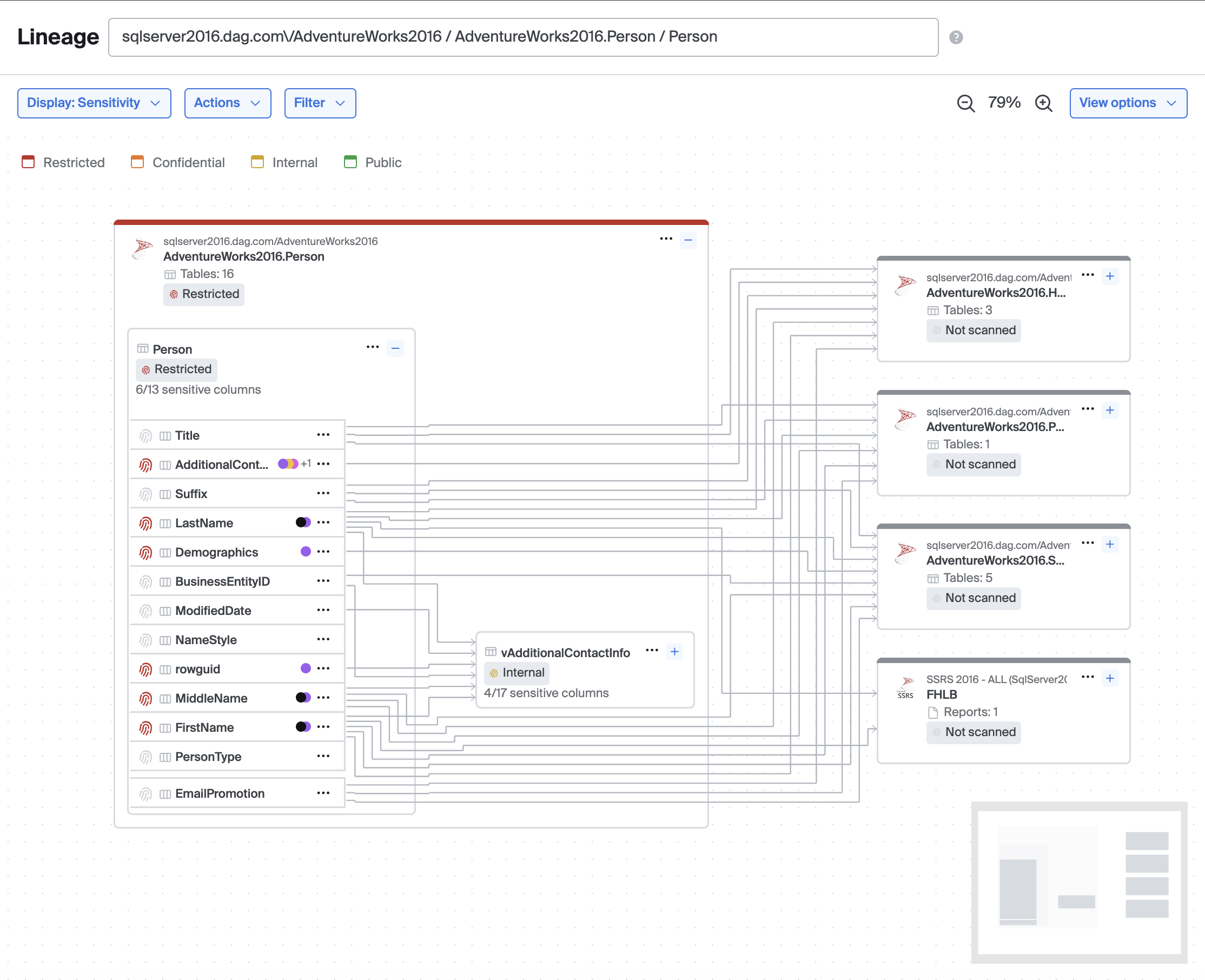
Added
Lineage
- Added a "View options" menu in the lineage header consolidating Fit to window, Recenter, Expand all nodes, and Collapse all nodes behind a single button (when the lineage graph view options preview is enabled)
- Added a "Default view" setting in Advanced Settings that lets workspace admins configure the default lineage display mode (Lineage only or Observability) for users who have not yet set their own preference
- Added support for referencing nodes in cross-repository lineage edges using a metacenter UID, enabling lineage between nodes in different custom repositories
Metrics
- Added a "Show metric list sparklines" advanced setting to control whether the metrics list displays sparklines and fetches their data
Sensitive Data
- Added data class categories throughout the UI, with categories included in CSV and PDF exports
- Added a scan run retry modal with support for selecting table partition columns
- Added test detector inputs for ML detectors in the Configure Detectors view
- Added a sensitive data section to source right-hand panes
- Added support for tracking late and missed scheduled scan runs
- Scan jobs and scan runs can now be sorted by schedule
Catalog
- Added the ability to edit and delete custom repositories directly from the catalog detail page
SSO
- Added an endpoint to enable or disable an SSO domain mapping
- Service accounts can now manage SSO endpoints
Updated
Lineage
- Expanding or collapsing nodes and loading more lineage layers no longer resets the zoom level — the graph pans to keep relevant nodes in view while preserving your current zoom
- Lineage graph views (Lineage only / Observability) are now enabled by default for all customers
- Renamed lineage view options: "Simple" is now "Lineage only" and "Issues" is now "Observability"; the menu trigger now reads "Display: <active view>"
- Assumed table edges are now created automatically alongside column-level edges by default, improving lineage performance
- The reorganized node context menu with logical groupings, dividers, and table-specific submenus is now enabled by default for all customers
- The Alerting path filter is now only shown in Observability display mode; switching to another display mode automatically clears it
- The Lineage tab on issue detail pages now shows column-level lineage by default when the issue is triggered by a column-level metric
- Direction filters (upstream/downstream) have been moved into the Filter menu as toggleable switches when the consolidated lineage controls preview is enabled
Service Accounts
- Service accounts are now enabled by default for all customers; "Beta" and "In development" labels have been removed from related advanced settings
Autothresholds
- Volume family metrics now snap negative lower bounds to 1 when recent history is all positive (otherwise 0), reducing false positives on volume metrics
- Bigeye no longer auto-annotates
FALSE_POSITIVEfor early data points in non-backfillable metrics
Sensitive Data
- Aggregate finding PDFs now show scan type
Fixed
Lineage
- Fixed the viewport zooming to the anchor node instead of the focused or highlighted column's table when using focus mode, highlight mode, or loading a page with those modes set in the URL
- Fixed unstyled expand, show more layers, and node menu buttons
- Fixed unstyled circular "Show more upstream/downstream" buttons appearing in the center of the graph
- Fixed pagination controls on entry container nodes shifting upward when a search filter reduced visible columns below the page size
- Fixed a timeout when downloading the lineage graph as CSV for very large lineage graphs
- Fixed expand/collapse buttons sometimes stretching vertically
- Fixed SSIS packages using certain destination types missing from MetaCenter lineage sync
- Fixed the "Deploy metrics" action showing in the lineage node menu and right-hand pane when observability is not enabled
Issues
- Fixed issue counts and issue lists for schemas, sources, and tables including issues from the right side of cross-source join rules
- Fixed a bug where issues for custom rules would not appear until the page was refreshed
- Fixed breadcrumbs for custom rule issues
Catalog
- Fixed an issue where re-discovering a previously deleted schema during indexing did not generate a schema change event
- Fixed search results for BI and ETL tool assets (PowerBI, Tableau, Matillion, etc.) not appearing in the catalog tree
- Fixed Issues tabs showing badge counts but displaying 0 results on entity detail pages
- Fixed the "Add monitoring" button appearing on source, schema, table, and column detail pages when observability is not enabled
Metrics
- Fixed handling of null dimension column values
- Fixed an issue where BigQuery volume metrics could show persistent 0-value data points
- Fixed grouped metric detail rows rendering with inconsistent chart cell heights
- Fixed schedule changes not appearing in the metric timeline
Bigconfig
- Fixed an issue where new metric definitions that shared a target column, filter, and lookback with another definition but had different thresholds were silently omitted from the plan
Notifications
- Fixed a race condition where companion metrics could create two Slack threads for the same issue
- Fixed SQL rule issue emails so the Location row links to the source detail page; added a new SQL Rule row that links directly to the rule
Platform
- Fixed an issue where IDP group memberships were not updated during OIDC SSO token refresh, previously requiring a full re-login for group changes to take effect
Sensitive Data
- Fixed a bug where all sensitive columns in Lineage were showing as 0 out of 0 columns
- Fixed a bug where changing ML detector type in Configure Detectors would silently reset the threshold to the default value
- Fixed column right-hand panes not displaying sensitivity information
Search
- Fixed the search API taking several minutes to respond for workspaces with large numbers of tables or columns
April 15, 2026
New Additions
Service Accounts
Service accounts in Bigeye are non human identities designed for secure programmatic access to Bigeye APIs and SDKs. Unlike regular user accounts, service accounts are not tied to an individual and are intended for use by automated systems such as data pipelines, monitoring tools, and internal applications
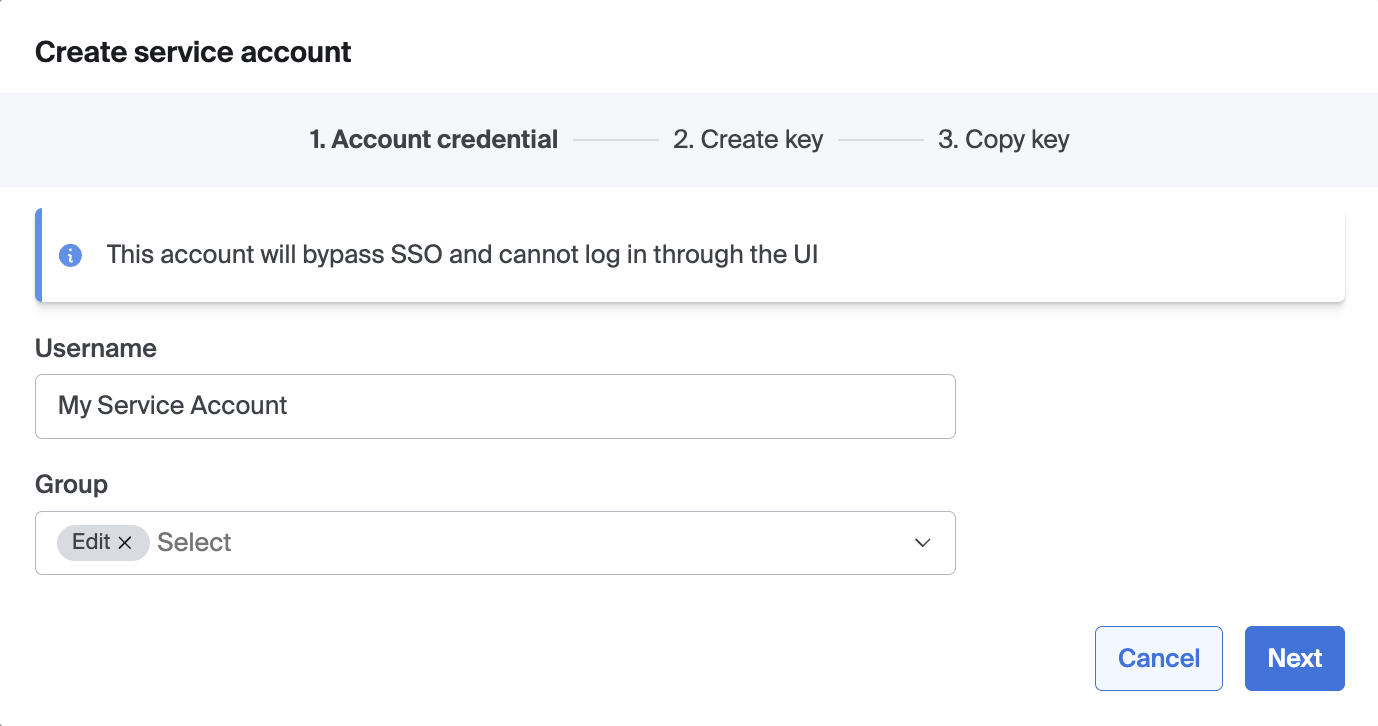
Added
Metrics
- Advanced setting for Snowflake dynamic tables in Freshness & Volume metrics
- Resolution suggestions on metric detail page
SDS
- Added daily GDF consumption tracking, which computes usage against contracted limits for billing purposes
- Backend: support query counts for "number of positive findings"
- Backend: set partition column for a table that failed to split
Lineage
- Added sensitivity legend
- Added the ability to expand table nodes in table-level lineage to view column-level connections on demand
- Added the ability to expand table nodes in the lineage graph to view and search their columns inline, without navigating away from the graph (requires the
preview.lineage_search_columns_in_tll.enabledfeature flag) - Sensitivity data (finding state, sensitivity level, and data classes) is now available on lineage nodes when viewing with the sensitivity lens
- Added "Highlight this column" option to the column context menu, which overlays column-level lineage on top of the existing table-level graph by dimming unrelated nodes and edges
- Added "Set as anchor node" action to node and column context menus, allowing users to navigate directly to a node's lineage page
- Added focus mode for column-level lineage — when viewing columns inline in an expanded table node, clicking "Focus on this column" filters the graph to show only the tables relevant to that column's lineage path and displays column-level edges between them. Use "Exit focus mode" from the node menu to restore the full graph view (requires the
preview.lineage_search_columns_in_tll.enabledfeature flag) - Added pagination to the inline column list on expanded table nodes, showing up to 10 columns at a time with next/previous controls
- Focus mode and highlight mode are now stored in the URL, allowing them to persist across page refreshes and be shared via link
Service accounts
- Added new create menu for users that includes service account option
- Added service account flag to user records
- Added service accounts feature flags
- API updates to manage service account API keys
- Added API to create a service account
- Notifications for service account API keys being created/deleted
- New API to list all service account API keys in the company
Catalog
- Added an Issues tab to the rule detail page showing current and past issues for the rule
Issues
- Added support for metricIds query parameter on the issues list page
Service Accounts
- Added service account edit modal
Indexing
- Added feature flag to enable oracle to index schemas, tables, and columns that do not have select access
Notifications
- Added Slack and email notifications for SQL rules and join rules with rule-specific labels, locations, and links
Updated
Catalog
- For unified catalog items, put the child objects tab before the lineage tab
- Hide lineage tab for expansive container-level node types (schemas, folders, workspaces, projects) when lineage for schema is disabled
- When a catalog entity has multiple child types, each child now shows a badge indicating its type
- Changed the Edit button on the source detail page to be a default (secondary) button
Lineage
- Re-ordered lineage sensitivity menus
- In Simple view, the status hat is now hidden on non-focused nodes to reduce visual noise
- Prevention suggestions in the lineage view are now only shown when the Issues view type is active
- Lineage RUM events now include a
secondaryActionflag that distinguishes initial page loads from subsequent user actions such as changing depth or switching view type - Renamed "Current node" to "Anchor node" in the lineage legend
- Highlight mode now shows column-level nodes grafted into the table-level graph, with non-active nodes and edges faded
SDS
- Add clarifying description to confidence thresholds in UI
- Tweak schedule-filter options for ScanJob/ScanRun fetch
- Length validation for user-supplied fields
- Store table sizes as part of indexing
Snowflake
- Set disablePlatformDetection=true to reduce the number of error logs produced by snowflake
Platform
- Enabled user preferences by default for all workspaces
Metrics
- Change schedule to companion instead of failing validation
Notifications
- Support generic test notifications for Slack
Access
- Pass in tables and columns being accessed
Issue
- Enabled grouped metric improvements by default, including retaining metric groups when absent or on failure and the improved issue feedback experience
Service accounts
- Prevent service account (and robot) emails from being shown in application
temporal
- upgrade temporal server to 1.29.6
Fixed
Catalog
- Fix a bug where expanding a tree node only showed the first 200 children
- Fixed an issue where catalog path items for custom data node entities showed an unspecified node type
- Fixed an issue where schemas with linked monitoring could be hidden, causing linked metrics to lose their table connections
- Fixed a hydration error on catalog pages that caused slow page loads and visual flashes when the catalog explorer sidebar was expanded
- Fixed an issue where Bigeye Virtual Schema would show custom rules that were associated with internal virtual tables
- Fixed an issue where join rules did not show the active issue indicator in the right-hand pane
Groups
- Further prevent IDP group linkings with whitespace in them
Issues
- Fixed AI-generated issue descriptions incorrectly identifying the monitored column for custom monitoring metrics with multiple columns or linked assets
- Correctly refresh overviews on button click
Lineage
- Fixed alignment and wording of the error message shown when lineage fails to load
- Added heartbeat to custom repository sync to catch/retry if a worker dies rather than just waiting for 2 hours
- Fix bug where view was not persisting between page loads
- Fixed CSV export of nodes and edges to reflect the currently selected lineage view (Simple, Issues, or Sensitivity)
- Custom repository icons and node types now display correctly when the "Optimized queries" advanced setting is enabled
- Fixed a timeout error when downloading the lineage graph as a CSV for large lineage graphs
- Fixed an issue where assumed parent edges created during a custom repository sync were incorrectly soft-deleted on subsequent syncs
- Improve performance of assumed edge creation
- Fixed an issue where custom repository sync would skip edge creation for nodes that were previously deleted and re-added
- Fixed issue where assumed edges were being followed from parent nodes in lineage
- Fixed the lineage graph firing duplicate requests on load due to view type initializing with a default before the stored preference was applied
Metrics
- Correctly process relative thresholds for volume metrics
- Fixed a divide-by-zero error in the Harmonic Mean metric when column values include both positive and negative numbers whose reciprocals cancel out, or when all column values are null
- Fixed issues handling metric dimensions when generating debug queries
- Fixed an issue where a metric with multiple open issues would return an unpredictable issue instead of the most recently created one
- Do not fail backfill run when metric runs have been deleted
- Correct valid warehouse types for metadata metrics
- Fix error when trying to compute relative threshold after a group metric has a group column removed
SDS
- Fix bug where Slack alert for Scan Job failure wasn't sent
- Fixed an issue where the source tree picker would not show more than one page of schemas or tables
- Remove aggregate findings for classifiers removed from scan job
- Add request validation to test-detector endpoint
- Test Detector cleanly surfaces internal errors
SQL Rules
- Fixed bug where valid sql rule preview results would claim to be invalid
UI
- Fixed a hydration mismatch error caused by the nav collapsed state not being rendered on the HTML element during server-side rendering
- Fixed an issue where the set-password page would hang after successfully resetting a password
- Fixed an issue where the collections dropdown input appeared shorter than other inputs
- Fixed bug where secondary nav in Advanced Settings would clip over the header
- Fixed random crashes on UI
- Fixed bug where text following inputs would sometimes be misaligned
BigAI
- Fix underscore issue
Charts
- Fix metric chart axis lacking sig figs in full precision mode
- Fixed bug where sometimes metric charts would not show any runs
SQL Parser
- Use required database type
Platform
- Fixed noisy error logs when checking table emptiness fails due to a warehouse connection failure
- Fixed an issue where importing a dbt project with a large ID would fail
Profiling
- Fixed an issue where profiling Snowflake views could fail with a column alias not found error
Settings
- Fixed redirect to login page from advanced-settings page
- Fixed an issue where navigating away from Advanced Settings would incorrectly show an unsaved changes warning
API Keys
- Fixed Last used column showing creation time instead of actual last used time
Advanced Settings
- Failed monitor notifications now test correctly
Bigconfig
- Correctly handle metrics with no lookback
Dimensions
- Prevent bulk write from failing on one write failure
Service accounts
- Fixed bug where the "Type" column would not always show in the users list
- Fixed bug where the back button was visible during the Service Account creation wizard
Issue
- Fixed a problem where updating an issue could get locked when AI resolution suggestions were being generated for the same issue
- Fixed editing a join rule from the issue overview opening the SQL rule modal instead of the join rule modal
Service Accounts
- Fix type in Service Account API key created notification email
March 17, 2026
New Additions
Lineage for Compliance
Lineage for Compliance introduces a set of enhancements designed to help regulated teams confidently meet audit and governance requirements. Users can now filter lineage views to focus on relevant data flows and share those views for repeatable evidence, export lineage as CSV for documentation, and access richer ETL details including transformation logic and originating sources.
Sensitive Data Scanning
Bigeye's new module is here! Automatically identify PII, PHI, PCI, PFI and other sensitive data classes hidden in your systems. Reduce regulatory risk, accelerate AI initiatives safely, and eliminate manual processes that don't scale. Reach out to your Bigeye representative to learn more about how you can try this new powerful solution.
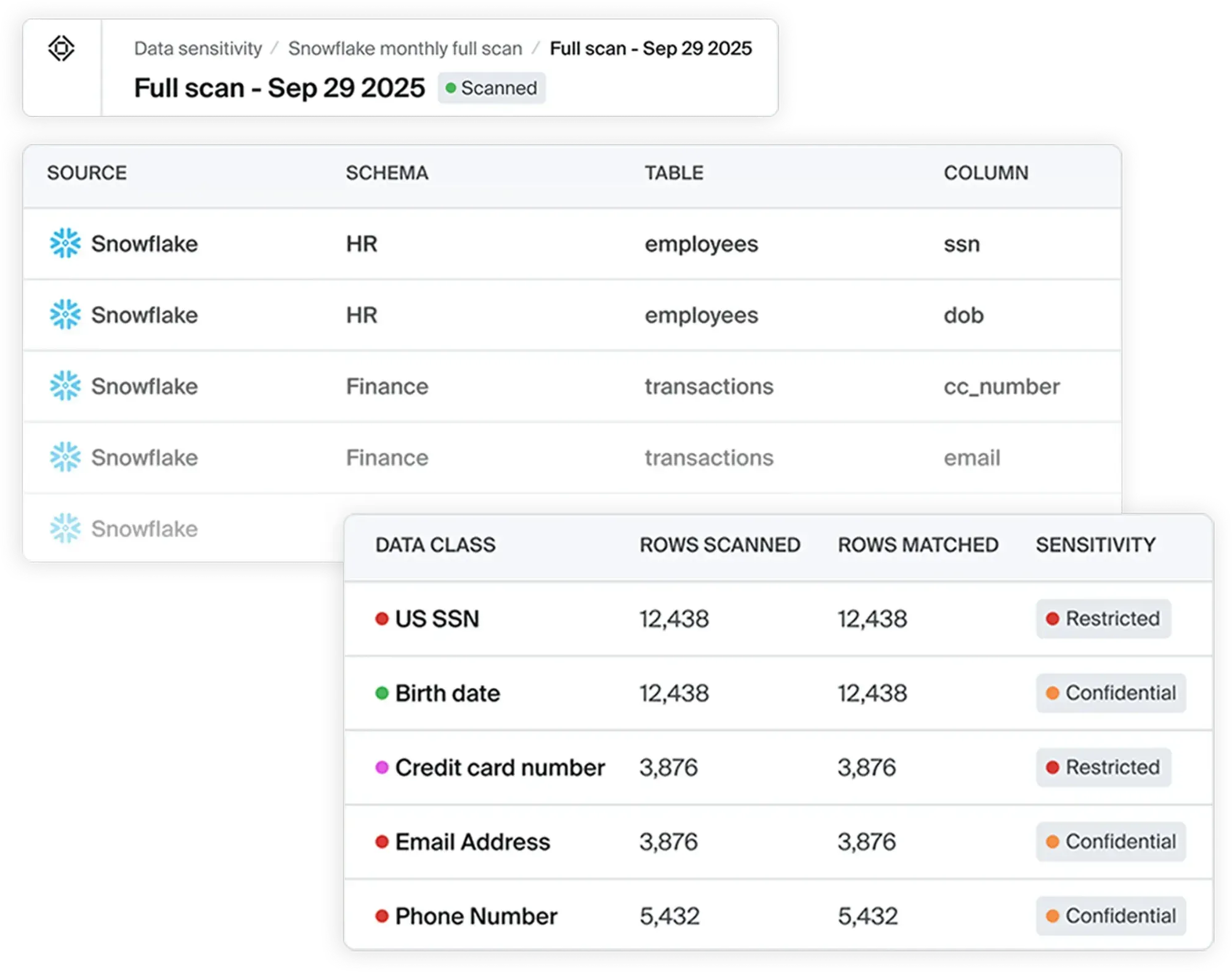
Other Additions:
Metrics
- Setting to remove the DYNAMIC_TABLE_REFRESH_HISTORY table from Freshness/Volume metrics in
Snowflake
Notifications
- Trigger failed monitor notification workflow when metrics fail and config is present
- Added Slack sending to failed monitor notification workflow
- Added UI and feature flag for Failed Metric Notifications
- Added email sending to failed monitor notification workflow
- Added webhook sending to failed monitor notification workflow
Sensitive Data Scanning
- Regex detectors now have configurable flags (default: DOTALL + CASE_INSENSITIVE)
Users
- Added backend framework for user preferences so that user selections in the app can be
carried across browsers
Updated
Metrics
- Change display when no autometrics are available for deployment
- Run backfills in temporal by default
Sensitive Data Scanning
- Enhanced UX of creating data classes in the classifier wizard
- Use scan run number of classifiers in the scan run list
- Changed the order of data class sensitivity dropdown options to follow sensitivity levels
- Added start and completion times to the tooltip for scan runs
Catalog
- Improve performance of catalog tree children loading
- Remove flashing on catalog layout load
- Reordered the profile tab to be after the columns tab
Issues
- Allow updates while AI overviews are being generated
Lineage
- Lineage views now have their own menu
- Make Lineage views sticky across multiple page loads
UI
- Updated caching strategy for pages loaded on a server to make fewer redundant requests
Fixed
Sensitive Data Scanning
- Allow canceling Scan Jobs stuck in the Scanning status
- Fixed bug where checkboxes would not populate properly in the edit flow of the scan job
wizard - Fixed a bug where errors would happen after clicking through the RCT screen too quickly
when creating a scan - Fixed bug where filter options were being duplicated in scan runs filter
- Fixed bug where only named schedules were showing up in scan runs filter
- Fix bug where the mark/unmark for reset scan icon wasn't updating until refresh
- Fixed bug where filter options were being duplicated in scan runs and scan jobs filters
- Fixed bug where only named schedules were showing up in scan runs and scan job filters
- Fixed bug where row creation time view would not update on selection change
- Fixed bug where user could send an empty regex to test detector endpoint
Issues
- Fixed AI issue overview incorrectly referencing a column name in freshness and other
table-level metric descriptions - Fix occasional duplication of company_issue_id (IS-XXXX)
Lineage
- Fixed bug with updating database internal lineage (column->table->schema) when the source
got large - Issues by table page uses issues view by default
SQL Parsing
- Fixed bug in sql parser API where requests missing sql resulted in 500 rather than 400
UI
- Fixed a bug where links from menu items may have an unneeded redirect
- Reduce layout shift on load from the global nav
Catalog
- Give delete source workflows enough time to complete
- Show "No results found" again when no results are found in catalog search
Collections
- Do not show View By menu on collections. Linked metrics and linked rules cannot be
assigned to collections - Fixed a bug where new collections would show all metrics in the workspace
February 18, 2026
Added
Catalog
- For lineage items in the catalog, show "Add monitoring" button
Metrics
- Added feature to retain groups on grouped metrics when they are absent from the data
- Added feature to retain groups on grouped metrics when they fail
SDS
- Added wizard for creating and updating Classifiers
- Advanced setting for data chunk parallelism--for improving scan throughput
- Implement backend support for Reset scans
- Increased logging
- Added Sensitivity tab to catalog source detail pages when relevant conditions are met
- Added creator avatars to scan job list
- Implement backend support for sampled scans, random sample scans
- Implemented Slack notifications for scan jobs. Scan completion, failure, etc.
- Email notifications will be sent on Data Sensitivity Scan Job failures if configured
- Implemented backend for PDF export generation
Issues
- Added configuration option on metrics to create issues for absent groups
Lineage
- Add "share link" menu item
- Features to hide ETL nodes and export as CSV are enabled by default
Observability
- Added splash page to inform users about observability features if they do not have it enabled yet
Updated
Catalog
- Attributes are linkified but not treated as full markdown to prevent markup problems with many synced attributes that use underscores and other characters mistakenly taken as markdown
Notifications
- Include metric name in slack notifications
- Updated notification messages to support missing group alerts
SDS
- Auto/incremental scans will now complete full scans if no RCT column is defined
- Call python service in a batch manner to improve scan throughput
- Add Classifier tooltips to Data Class badges in findings tables
- Handle malformed regular expression input for Classifier Detectors
- No longer show Reset scan icons for scan findings of scan type Full
Issues
- Issue groups now are virtualized - meaning that they are not all rendered to the browser at the same time. Only visible groups are, allowing users to navigate without paging
Metrics
- Add a field to configure a grouped metric to alert on absent groups
- Count Read Queries metric uses Snowflake custom history tables
- Hours Since Last Load metric uses Snowflake custom history tables
- Rows Inserted metric uses Snowflake custom history tables
- Show metric run points for failed runs, as long as they have chartable times
UI
- Added scrolling buttons to overflowing tabs
- Enable sectionized navigator by default
Unified Issue Inbox
- Modified condition for show dbt test monitor subtab in catalog
Nav
- Control links and ordering on nav based on which of observability and sensitive data are enabled
Search
- Improved readability of available search types on the search screen
Settings
- Added two settings: one to retain failed metric groups, and one to retain absent metric groups
Encryption
- Synchronize when loading encryption keys
Lineage
- Added ability to choose which data to render with the graph, whether it's sensitivity, monitoring (metrics and issues), or neither
- Added ability to exclude children from graphs, meaning that column-level lineage is not displayed
Fixed
Metric Runs
- Do not revert changes that happen to metric while it's running
SDS
- Bugfix for can't edit Bigeye-provided ML classifiers
- Remove sorting of RCT columns in Scan Job Wizard
- Fixed bug in Scope Selection View for the Scan Run Wizard where searching would never show schema nodes
- Fixed bug where closing the modal would not clear the search on the scope select view
- Show both positive and negative findings in the aggregate findings table and csv download
Metrics
- When there is a toggle for linked metrics, show the feedback buttons as appropriate for the toggled metric
Assets
- Prevent double submissions when clicking the Link and Unlink menu items
Profile
- Added the correct VIEW identification for SQLServer
Security
- Improved nonces for script tags in app
UI
- Fixed bug where searching paginated lists would only search the current page under certain circumstances
January 14, 2026
New Additions
Data Sensitivity Module - Private Preview
Discover and classify sensitive data across your structured data environment with ease! We are so excited to be helping customers secure their data by taking this critical first step. Reach out to your Bigeye representative to get access to this module's private preview.
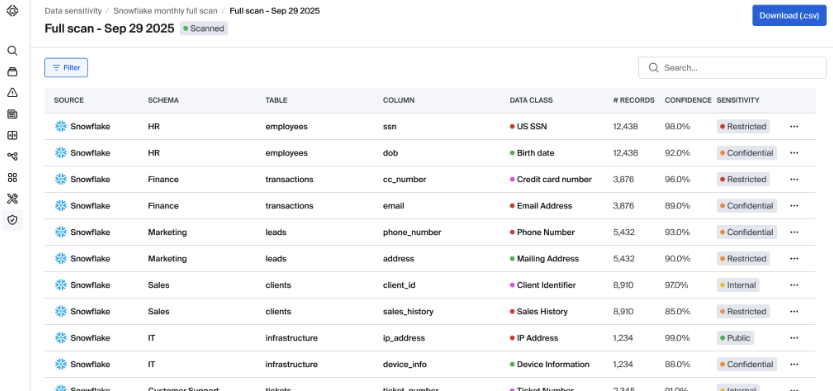
Other Additions:
Added
Catalog
- Added a custom repository field to catalog attributes so that attributes modified with custom repository sync will not override other attributes on those entities
Notifications
- Added a setting to optional exclude the Bigeye logo from email notifications
- Added API for specifying channels for failed monitor notifications
SDS
- ML detector improvements
- Beginning components for add/edit classifier wizard
- Auto scan development - ability to scan a full table and then incrementally added data after
- Incremental scan development - choose a start date and then scan only data existing or added after the chosen date
- Partial retries on scan failure workflows
Issues
- Added API support for configuring custom HTTP headers for external ticket provider webhooks
- Added UI support for configuring custom HTTP headers for external ticket provider webhooks
- Adds new compact group metric issue view
- Feedback may be provided for groups inside of issues for grouped metrics
- Filter issue groups by feedback
Metrics
- Setting to prevent widening autothresholds on false positive
- On metric run, validate that DTW metrics have a resolved RCT
Lineage
- Added APIs to export a graph nodes or edges as CSV
- Added option (behind feature flag) to hide ETL nodes on Lineage graphs
- Added option to Export CSV for nodes or edges from Lineage graph
Security
- Create company-specific DEK on company creation
Updated
Unified Issue Inbox - Monitors
- Updated external monitor create to set the data dimension if specified on request
- Updated scorecards to handle external monitors
Lineage
- Updated lineage UI to not show the child objects tab if it is a leaf node/column type node
- Allow custom node types to be designated as column types
Metrics
- Correct MERGE values for Databricks F&V
Issues
- When closing an issue for a grouped metric, notify the user that there are ways to provide feedback per group
- Issue group annotations/feedback show for the issue, not the latest metric run
Fixed
Indexing
- Properly restore template metrics when a soft deleted table is restored during indexing
Unified Issue Inbox - Monitors
- No longer override users in the metric deploy modal if they chose "None" for a table's RCT
- External monitor issues are properly opened with a medium priority
- Fixed dark theme metric monitor type icon
- Fixed metrics subtab count not including linked metrics
- Fixed metrics list not showing "View by" control when there were no metrics
MetricsScorecard
- Fixed empty "Data quality" and "Pipeline reliability" headers showing when no monitoring is deployed
Metric deploy
- Fixed bug where distributions metric bundle would sometimes incorrectly state that it had full coverage
December 17, 2025
New Additions
Unified Issue Inbox
Bigeye now supports monitoring additional signals, such as dbt test failures, bringing all data issues into a single, unified inbox. With these new monitors, your team can manage issues and incidents from one centralized view, making it easier to prioritize and respond.
This release also includes interface improvements across Bigeye. The new Monitoring tab streamlines navigation within the catalog, and updates to the issues list page make it easier to track and manage both issues and incidents.
Learn more about all the updates in the documentation here.

Here are some notable changes that are coming to the Bigeye app in this release:
-
The Metrics tab in the catalog has changed to the Monitor tab and monitors types are displayed in a toggle menu inside the Monitor tab
-
Linked Metrics and Linked Rules are now accessible by clicking the 'View by:' filter option and selecting Linked metrics if in the Metrics list and Linked rules if in the Rules list.
-
In the Issue list page you can now filter by monitor type.
-
In the Issue list page you can access Incidents via the Incidents tab at the top of the page.
Other Additions:
Sensitive Data Scanning
- Out-of-the-box data classes and classifiers
- Endpoints to get sensitive data aggregate findings
- New endpoint - reset classifier to default
- New endpoint - reset data class to default
- Scan large BigQuery tables with required-partition-filters
Custom repository
- Added endpoints to pull all nodes/edges for a custom repository
Updated
Catalog/Search
- Do not display MetaCenter/Lineage Plus repositories that have been disabled via copy_disabled
Rules
- Added dimension and asset linking to custom rules timeline
UI
- Organized the links in the GlobalNav into Metadata and Observability subsections. Some items have changed order
- With the sectioned global nav, Schedules has been moved into the settings
Catalog
- Added screen to disable MetaCenter repositories per workspace
- Enabled Lineage Plus nodes to show in Catalog by default
- Fixed alt text for many source types
Counts
- Updated query counts to support filtering by monitor type
Custom repository
- Custom repository sync now uses S3 for the payload
Join Rules
- Exclude join key columns from default linked assets
Lineage Plus
- New Lineage Plus (MetaCenter) Repositories are disabled by default
Metrics
- Remove 0-row records in Databricks F&V
Monitors
- Filter issues, filter metrics, and count issues by monitor type
- Issues are created for alerting external monitors
Notifications
- Updated notification formats for external monitors
RCT
- /api/v1/metrics/date-columns/bulk also supports source and schema ids
Fixed
Metrics
- Updated a metric alert email link to specify that it was for a collection instead of an SLA
- Fixed bug with integer overflow in BigQuery sum/average metrics on large tables by casting to BIGNUMERIC type for maximum precision
Catalog
- Added database indices to speed up unified catalog queries
Custom repository
- Deleting a custom repository will properly delete all of its nodes and edges
Lineage
- Qlik Sense now shows properly as an available search type
UI
- Fixed bug in tab switching logic that sometimes resulted in a Not Found page
Settings
- Fixed the schedules list that shows on the settings page
Artificial Intelligence Updates:
November 19, 2025
New Additions
Introducing Data Profiling: A fast, secure way to understand table health and generate AI-powered monitoring in minutes. Get an immediate view of column-level quality, patterns, and anomalies with safe-by-default profiling. Quickly convert insights into monitors directly from the profile with a single click. Access this feature in the new Profile tab at the table level of your catalog today!
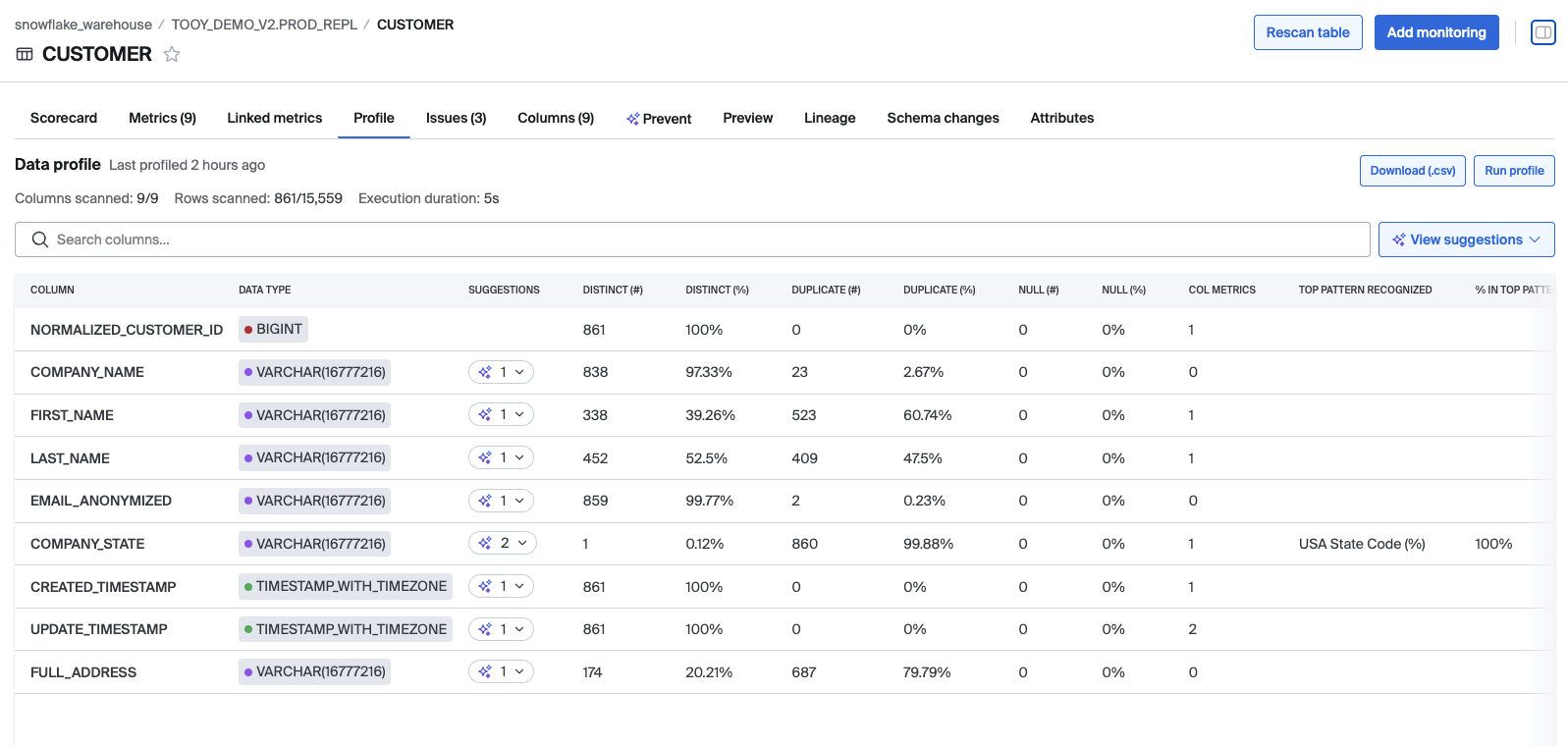
Other Additions:
Agent Connections
- Added support for connecting SQL Server datasource using Entra ID
Profiling
- Table-level metrics such as freshness and volume will now show as suggestions from profiles to create metrics easily from profile tab
Asset Linking
- Added/removed linked columns now show in the timeline
Updated
Asset linking
- When searching for an asset to link, backwards cascade search fields if we have the information
Lineage Plus
- Added a backoff-and-retry strategy if the portal server is having issues getting a database connection for lineage requests
Profiling
- Disable profiling on struct, array, and struct-child fields (not supported in this iteration)
- Show large numbers with commas in the profile results
- Shortened some column labels to narrow the columns for better horizontal viewing
Search
- Only show Lineage Plus connections that have been previously been loaded into Bigeye
Catalog
- "Lineage nodes in catalog" flag shows now as Beta in settings
- Data sources lists now show unified catalog entity roots
Issues
- Update issue summary to use metric name instead of template name
Metrics
- Freshness and Volume for BigQuery only include completed operations
Bigconfig
- Allow larger Bigconfig files
Data Dimensions
- The final step in the template deploy modal will now autofill the dimension dropdown to Custom if the metric's template is in the Custom dimension
Scorecard
- Simplified MetricsScorecard chiclet legend by removing "No data" state and consolidating with "No metrics deployed" see Scorecard doc for definitions.
Fixed
Metric
- Fix bug where metric execution would continue to look back very far when trying to get the max metric time
- Handle failed metric runs due to no data
Catalog
- Fix heartbeat timeouts in popularity score workflows
- In unified catalog, show breadcrumbs for elements in tooltip
- Fixed catalog entity children counts for dbt source nodes
- Prevent some nodes from erroring out when the tree was searching for their children
- Prevent unwanted requests to source/integration data from row actions menu
- The child objects list for custom repositories no longer lists its children as "Entities"
- Fixed a bug where nodes that had no children were not opened automatically in the tree when the page loads
- Fixed an issue where the selected node on the page would not expand when the page loaded
- Improved catalog filters for workspaces
Metrics
- Corrected column link in email notifications
Metric deploy
- Make sure to set the first column as RCT as the modal shows when deploying freshness (data) and volume (data)
Custom SQL Rules
- Allow upper and lower thresholds to be omitted
Tabs
- Made tabs work a little better with middle/right clicks
Artificial Intelligence Updates:
Issue overviews and Resolutions
- Use Claude Haiku 4.5 is now used for generating bigAI overviews and resolutions
October 15, 2025
New Additions
Custom Data Dimensions - Bigeye customers can now fully customize how they organize their data quality metrics. With Custom Data Dimensions, teams can define and manage the categories that matter most—like Freshness, Validity, and Uniqueness—to align perfectly with internal frameworks and reporting needs. This feature is available today for all users. Please refer to the doc page to get started customizing your dimensions.
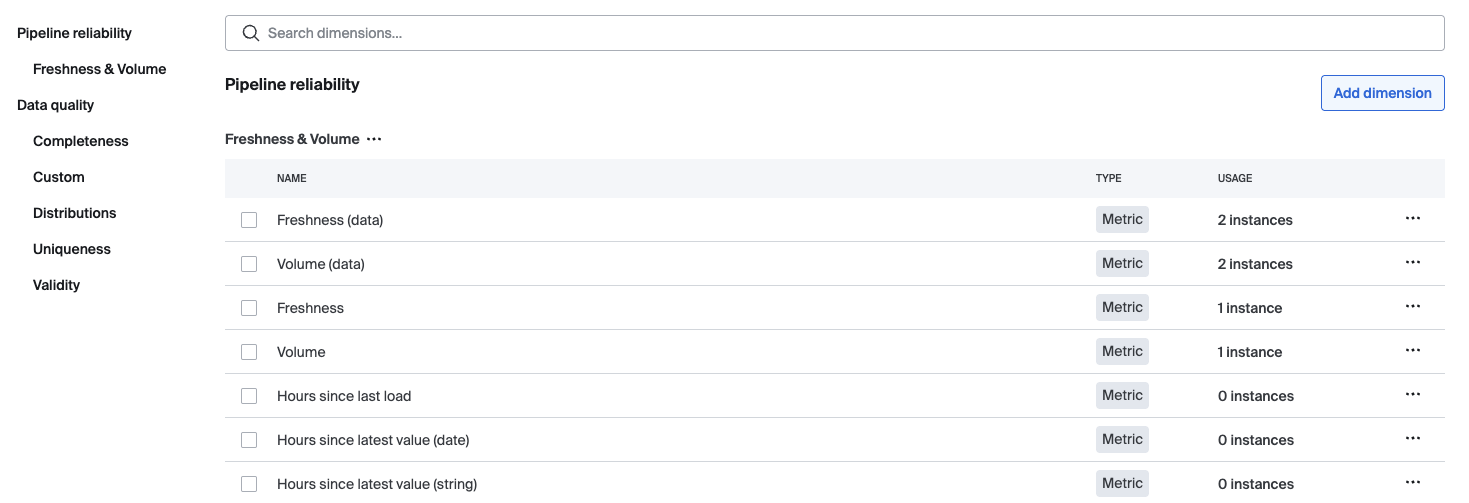
Other Additions:
Lineage
- Added "View in catalog" option to lineage node context menus
Join Rules
- Added "Create a join rule" menu option in the right hand panel for the join rule page
MCP Gateway (beta)
- Added new endpoint and http client for storing data access logs in s3
- Added endpoint to get MCP Gateway data access logs from s3 bucket
Dimensions
- Added params to Create dimensions endpoint to disable creating, assigning or backfilling
Updated
Metrics
- Set dimension in SDK create flow
- Metric refresh now uses the bulk queue workflow API
- Hide lower bound threshold field for freshness metrics in constant and standard deviation threshold configurations
Source
- Set a description for HTTP path fields for databricks source additions
- Updated terminology used in the Source right hand pane to match source creation/addition forms
UI
- Only display the right pane divider if there is an active call-to-action button
- Reduce the size of the API keys headings to be h3 instead of h2
- Updated some menu links to use in-app navigation
Virtual Tables
- Added pagination to the virtual tables list
Catalog
- Make the "Row Creation Time" section in the right hand panel bold
- Add the integration exception alert component to the integration etl detail page
Dimensions
- Updated the description for the dimension selector field
- Make dimension updates more descriptive by providing the previous and current dimension display names on the metric timeline and edit dimension toast
Issues
- Added the user's local timezone abbreviation in the metric timezone dropdown local option
- Show the right hand panel toggle button for View Only users
- Hide "More suggestions" button by default
Agent
- Track data-source agent version
Lineage
- Removed external link icon from "View in catalog" menu items in lineage nodes and made item a link
- Turn Snowflake table-level lineage off by default
Rules
- Standardized percentage formatting for join rule displays with consistent precision and added tooltip
Fixed
Catalog
- Delete metric templates when deleting a warehouse
Indexing
- Invalid Virtual Table does not fail indexing
Scorecard
- Correct issue count in current dimension scorecard
- Dimension scorecard links now properly filter metrics and issues by dimension when navigating to list views
Slack Notification
- Fixed notification formatting for incidents with long list of child issues
Dimension
- Fixed how the default dimension for templates is found and verified
- Fixed display of metrics in the dimension timeline when they moved from one dimension to another
Metrics
- Fixes debug query syntax error
- Show correct threshold types for companion metrics and do not display lowerbound field for freshness metrics
Search
- Fixed search result links on non default workspaces
Join rules
- Fixed the create join rule menu item on the right hand pane
Asset Linking
- Fixed some oddities with the linked metrics and linked rules lists
Monitoring
- Fixed back button showing in the monitoring deploy wizard when there was no view to go back to
Issues
- Prevent workflow timeout in root cause analysis
September 16, 2025
Added
Metrics
- Endpoint to get suggested observed columns for Asset Linking
- Observed Columns API endpoints
- Bulk list filters based on custom rule
- Counts for linked metrics and linked custom rules
- Set default observed columns when creating metric
Join Rule
- Added join rule detail runs tab
Updated
Owners
- Do not update the owner if it is the same
Databricks
- Update the databricks JDBC version to most recent version [this is a good one, and note that I do try to clean up the lines to be a bit more clear and professional as I go through]
Asset Linking
- The link/unlink menu items were updated
Join Rules
- Support joins within the same source
- Update API docs
- Validate join rules on create/update
Rules
- Custom rules have been renamed to SQL rules
- Updated the appearance of the No description text
Fixed
Custom rules
- Fixed bulk run operations
Metrics
- Handle duplicate metrics for observed columns
- Don't show assets for deleted metrics or columns
UI
- Fixed alignment of various errors
- Fixed metric overview layout in the edit metric drawer
Assets
- Fixed problems around the favoriting of assets
- Require source input before searching for column
Join rule
- Preserve collection when editing a join rule
Asset Linking
- Remove duplicates from lists
Artificial Intelligence Updates:
bigAI
- Gracefully handle metric being deleted
August 19, 2025
New Additions
Metrics
- Add PercentDistinct and PercentDuplicates statistics as deployment options
- Added new
Hours since latest value (string)metric that takes the max value of a given column, treats it as a date/timestamp string, and computes the delta between the metric execution time and that value. The primary use case for this is when there are no true date/timestamp fields, the string is representing a date.
Warehouse
- Prefix can be set to ignore matching schemas by name to improve efficiency of indexing
Join Rules
- Support for RCT filters for join rules
- When creating a join, a rolling window query may now be added with a row creation time column
Rules
- Empty state for rules "Add SQL rule" button goes straight to the add SQL rule flow
- Empty state for rules now includes an "Add join rule" button
Metric deploy
- Add template to tooltip helper text for template options so that it is clearer
Updated
Indexing
- Enabled setting a cron schedule for source indexing to distribute load in a more sophisticated way
Catalog
- Cross source agent status is factored into agent status indicator to help users know which sources are part of the cross source agent for join rules
Custom monitoring
- Updated empty states for virtual tables, templates, and schedules
Join rules
- Hide join rules from Add Monitoring modal if the table does not use cross source agent
- Added note in join modal that tables must be in an agent-source
UI
- Updated Next.js framework to 15.4.1
- Updated background and text colors for user avatar
- Added vertical spacing between the Issues Add Comment text area and send buttons
- Updated Pill and Badge component typography to 14px
- Updated the button pill variant typography to 14px
Issues
- Move the Oldest issues sort by option to underneath the Recent issues option
SSO
- Clearer error messages for SSO failures
Search
- Update catalog path search behavior to be more intuitive
Timelines
- Improved custom rule cache invalidation to include revision history updates after editing rule
Fixed
Deltas
- Fixed bug where the "Create Delta" button would not open the modal after viewing an existing delta's details page
- Fixed empty state display to use real-time delta count instead of stale server-side count for accurate UI updates
Indexing
- Fixed bug where trying to schedule with a cron would fail due to incorrect cron format
- For Databricks sources, fix a bug where we'd treat 0 views returned from a source as an error, and then issue an invalid query
Issues
- Fixed bug where companion metrics were not correctly updating status on issue list page
Metric Deploy
- Fixed default metric owner assignment
- Fixed a bug where a loading message would show even when the metric deploy had failed validation
Metrics
- Fixed metric query to show a query in the UI even if we are unable to get the latest RCT for the metric
Slack
- Fixed bug where notifications would fail to send for older issues without a description field
UI
- Fixed cases where autocomplete options would force the dropdown to scroll
- Fixed errors occurring after deploying metrics from the Add Metric Wizard
Lineage
- Fixed bug where graph would attempt to be parsed on empty Lineage
Rules
- Fixed some bugs around the navigation that occurs after a successful edit or creation
Scorecards
- Centered the historical scorecard row labels
Updated 2 days ago