

AWS S3
The Amazon S3 connector catalogs the folders in your S3 buckets in Bigeye. You can map folders to the warehouse tables their objects load into, so you can see which S3 folders feed which tables.
The Agent CLI sets up and runs the Amazon S3 connector. After a run, your S3 data appears in Bigeye's catalog under:
Amazon S3 → <connection> → <bucket> → <folder>Prerequisites
Before you begin, make sure you have:
- The Agent CLI 2.51.0 or later, with the Lineage Plus agent installed on a Docker deployment. Amazon S3 doesn't run on Kubernetes deployments.
- AWS access through access keys, or through the IAM role of the EC2 instance the agent runs on. It needs
s3:ListAllMyBuckets, pluss3:ListBucketands3:GetObjecton the buckets you want to catalog.
Set Up the Connection
./bigeye-agent add-connector -c s3The CLI asks for a name for the connection, then for:
-
Sign-in. Choose one:
-
Access keys: an access key ID and secret access key. The CLI encrypts the secret key in
bigeye_agent.yml. With a secrets manager configured, you give the key's location in it instead. -
EC2 instance role: the agent uses the IAM role attached to the instance it runs on, so there are no keys to store or rotate. The agent reads the role from inside a Docker container, which needs the instance's metadata hop limit set to 2:
aws ec2 modify-instance-metadata-options --instance-id <instance ID> --http-put-response-hop-limit 2
The CLI then lists the buckets the sign-in can read, with how many are in each AWS region, or shows AWS's error if the sign-in fails.
-
-
Buckets to include. A comma-separated list of bucket names. Leave it blank to catalog every bucket the sign-in can read, including buckets created later. That can mean a very large number of objects and a long first run.
-
Catalog mode.
- Folders, the default, adds one catalog entry per folder, with its file count.
- Files adds one entry per object, which can flood the catalog. Choose it only when you know roughly how many objects the buckets hold.
To change any of these later, run ./bigeye-agent edit-connector -c s3. The connection keeps its folder mappings.
AWS Regions
The connection catalogs buckets in every region AWS enables by default. Buckets in opt-in regions (regions launched after March 20, 2019, such as ap-east-1), AWS GovCloud (US) and China can't be cataloged yet. Setup lists any of these that the sign-in can read, and the connection skips them on every run, including ones created later, so they don't fail its runs.
Run the Connection
./bigeye-agent lineage run -c s3 -n <connection name>The first run adds your buckets and folders to Bigeye's catalog. To run the connection on a schedule, create a job with ./bigeye-agent jobs upsert.
Map Folders to Tables
A mapping tells Bigeye which warehouse table a folder's objects load into, so the folder shows lineage to that table. Mappings are optional: without them, your folders still appear in the catalog.
After the connection's first run, run:
./bigeye-agent lineage map-folders -n <connection name>- Pick a folder. Up to 20 folders show as a list you can filter by typing. With more, type part of a path and the matches update as you type. Each folder shows its file count, and folders that already have a mapping show
mapped. To map a parent folder that groups several folders, choose Enter a path that isn't listed, or with more than 20 folders type the path. An object belongs to the longest mapped path that contains it. - Pick the table. Choose the source, then the schema, then the table, from lists that work the same way.
- Map another folder, or finish. Picking a folder that already has a mapping offers to change its table or remove the mapping.
Each mapping takes effect at the connection's next run. When you finish, the command offers to run the connection so the lineage shows up in Bigeye.
The table must already be in Bigeye's catalog. The connector links folders to existing tables and doesn't create them.
Until a connection has a mapping, each successful lineage run of it from a terminal ends by pointing to this command.
Verifying Results
After the connection runs:
- Go to Catalog in Bigeye
- Search for your bucket name or connection name
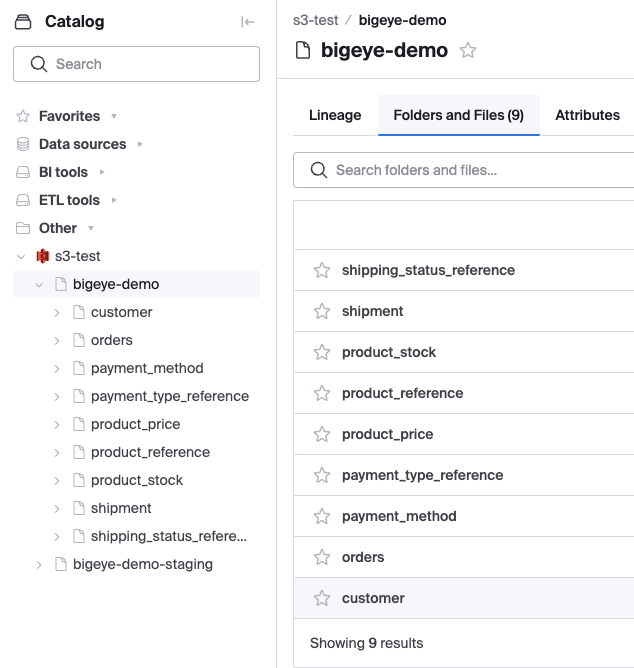
- You should see your S3 data organized under: Amazon S3 > <connection> > <bucket> > <folder>
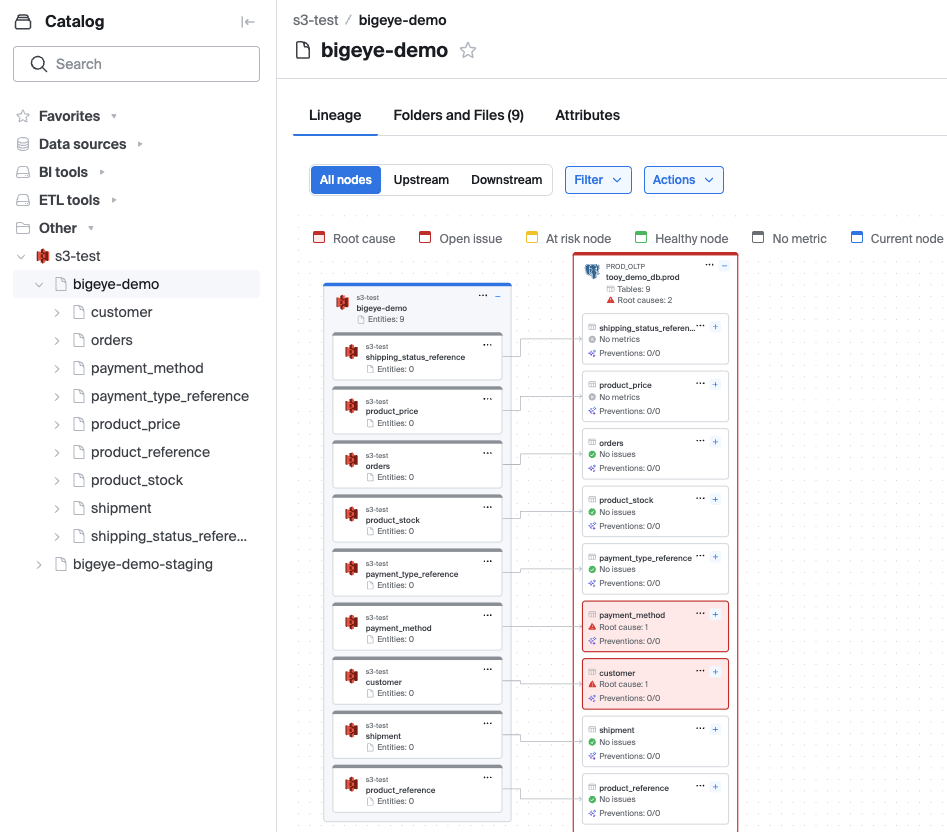
- Click a folder and select the Lineage tab to see its links to downstream tables
Troubleshooting
Setup finds no buckets
- Check that the access keys or the instance role belong to the AWS account that holds your buckets.
- The sign-in needs
s3:ListAllMyBuckets.
The run fails to sign in with the EC2 instance role
- Set the instance's metadata hop limit to 2, as shown in Set Up the Connection. Setup checks the role from the host, so it can't tell whether the agent's Docker container can reach it.
- When the connector can't reach the instance's metadata service, it logs a warning, and the connection fails after about two minutes.
A bucket is missing from the catalog
- Check the connection's buckets to include with
./bigeye-agent edit-connector -c s3. - Buckets in opt-in regions, AWS GovCloud (US) and China are skipped (see AWS Regions).
- The sign-in needs
s3:ListBucketands3:GetObjecton the bucket.
Lineage edges not appearing
- Run the connection after mapping: each mapping takes effect at the connection's next run.
- Make sure the table is in Bigeye's catalog. Go to Catalog > Data sources, click your source, and check the schema and table names.
Updated about 4 hours ago